The patience diff algorithm and the Myers algorithm both compare two versions of a file, but they optimize for different things. Myers finds the mathematically shortest set of edits. Patience diff first matches up the unique lines the two files share and uses them as anchors, which usually produces a more readable diff — especially for source code. Neither is "more correct"; they just make different trade-offs, and knowing which is which explains why the same change can look clean in one tool and confusing in another.
A Quick Recap of Myers
The Myers diff algorithm is the default in Git and most tools. It finds the shortest edit script — the fewest insertions and deletions needed to turn one file into the other — which is the same as finding the longest common subsequence of the two files. It is fast, optimal in the number of edits, and content-agnostic: it looks only at whether lines match, not at whether a line is meaningful.
That last part is the catch. "Shortest" is not always "clearest."
The Problem Myers Can Have
In source code, a lot of lines are not unique. Blank lines, a lone }, an import, a return — these repeat all over a file. Because Myers only cares about matching lines to minimize edits, it can happily match a closing brace near the top with a closing brace further down, whichever makes the edit count smallest.
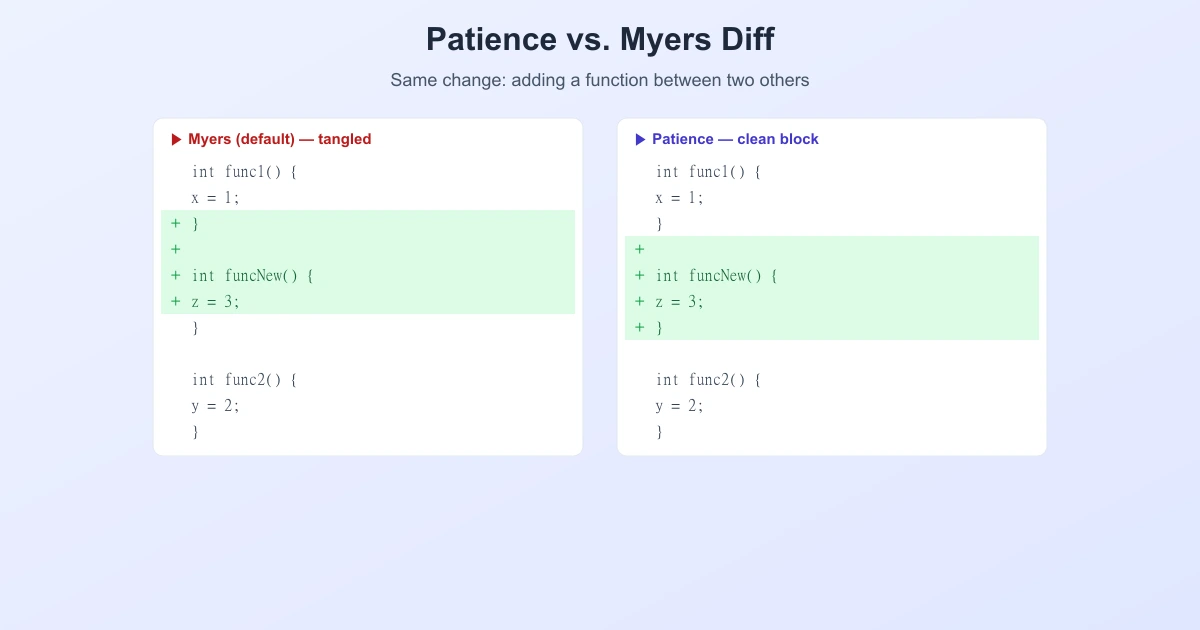
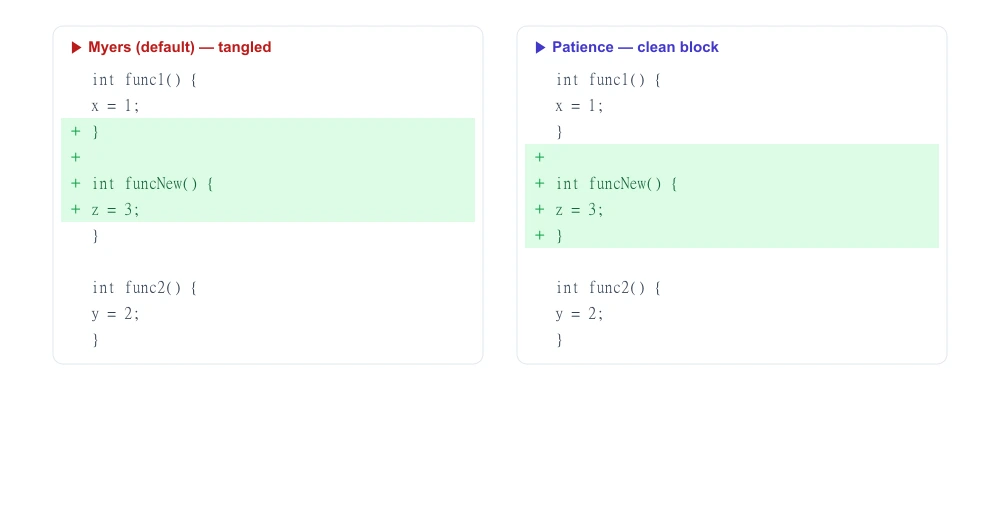
The result is a technically-correct but human-confusing diff: a newly added function can look like it "borrowed" the closing brace of the function above it, splicing two unrelated blocks together. The edit count is minimal; the readability is terrible. This is exactly the situation patience diff was designed to fix.
How Patience Diff Works
Patience diff takes a smarter, content-aware approach. Instead of matching any lines, it starts with the lines that are most likely to be meaningful: the ones that appear exactly once in each file. It runs in four steps:
- Find the unique common lines. Scan both files and keep only lines that appear exactly once in each. A function signature like
int parseInput(char *raw)qualifies; a lone}does not. - Match them in order. Compute the longest common subsequence of just those unique lines. These become the anchor points — reliable, meaningful lines the two files agree on.
- Recurse between the anchors. The anchors split each file into smaller sections. Patience then repeats the same process inside each section.
- Fall back for the leftovers. When a section has no more unique lines to anchor on, it finishes with a plain diff (typically Myers) on that small piece.
Because the anchors are distinctive lines, the diff lines up on the parts a human would recognize — function declarations, unique statements — instead of on interchangeable braces and blank lines.
Why is it called "patience"?
The name comes from patience sorting, a card-game-based technique for finding a longest increasing subsequence. Patience diff uses that method in step 2 to match the unique lines efficiently. So the name describes the mechanism, not the speed.
Same Change, Two Results
Picture adding a new function between two existing ones. Myers, chasing the shortest edit, can match the wrong braces and produce a diff where the added block is tangled with the function above it. Patience anchors on the unique funcNew() line and shows the new function as one clean, self-contained addition:
Patience vs. Myers at a Glance
| Myers | Patience | |
|---|---|---|
| Optimizes for | Fewest edits (shortest script) | Readable, meaningful alignment |
| Matches on | Any lines that match | Unique common lines first |
| Best for | General text, speed | Source code, moved blocks |
| Weakness | Can align on braces/blanks | Slightly slower; not always minimal |
| In Git | --myers (default) | --patience |
When to Use Each
- Reviewing source code? Patience usually wins. It keeps functions and blocks intact and produces diffs that match how you think about the change.
- Comparing prose, logs, or data? Myers is fine and fast — most of those lines are already distinctive, so the brace problem does not arise.
- Getting a messy, tangled diff? Switch algorithms and compare. In Git, try
git diff --patienceorgit diff --histogram(a faster refinement of patience) to see if the result reads better.
It is worth knowing that both algorithms rest on the same foundation — the longest common subsequence. Patience simply computes it on a curated set of unique lines first, then fills in the gaps. That is why understanding LCS makes every diff algorithm easier to reason about.
What This Means for Everyday Comparison
Most online tools, including when you compare text online, use a Myers-style diff because it is fast and works well on general text and documents, where lines are naturally varied. The patience approach shines mainly in code review, where repeated structural lines would otherwise confuse the alignment. Both are aiming at the same goal: show the smallest, clearest set of changes between two versions.
Frequently Asked Questions
What is the difference between patience diff and Myers diff?
Myers finds the shortest set of edits and matches any lines that line up, which can accidentally align on braces or blank lines. Patience first matches lines that are unique to both files, using them as anchors, which produces a more readable diff — especially for source code.
Is patience diff better than Myers?
Not universally. Patience produces clearer diffs for source code because it anchors on meaningful unique lines. For general text, logs, and data, Myers is fast and works just as well. "Better" depends on the content.
Why is it called the patience diff algorithm?
It is named after patience sorting, a card-game-based method for finding a longest increasing subsequence, which patience diff uses to match up the unique common lines between the two files.
How do I use patience diff in Git?
Run git diff --patience, or set it as the default with git config --global diff.algorithm patience. Git also offers --histogram, a faster variant of the same idea, and --myers (the default).
Does patience diff use the longest common subsequence?
Yes. It computes the LCS of the unique common lines to place its anchors, then recursively diffs the sections between them. Both patience and Myers are built on the LCS idea; they just apply it differently.
Is patience diff slower than Myers?
Usually slightly, because of the extra pass to find and match unique lines. For everyday files the difference is negligible, and the more readable output is often worth it for code review. Histogram diff was designed to keep patience-style quality while being faster.
Related Reading
Compare Two Versions Yourself
Paste two versions of any text or code and see a clean, word-level diff in seconds — free and private.
Try TextCompareo