To compare text ignoring whitespace, choose which spacing differences you want to hide, then review the result. Tools handle spaces, tabs, and line breaks differently. Keep your originals, test the setting on a small sample, and use a separate source check when formatting affects meaning.
A cleaner diff can make wording edits easier to read, but it can also hide something you needed to catch. We tested nine pairs in the live TextCompareo text comparison tool on 26 October 2026. Each pair ran twice: first with all four options OFF, then with only the named option ON.
The main finding: options OFF did not mean an exact source comparison. Several spacing changes already produced 100% similarity. The examples below show the actual results, including that limit.
Which comparison settings should you use?
Start with the change you need to review, and ignore a detail only when you have decided it does not matter.
| Review task | Useful approach | What still needs checking |
|---|---|---|
| Wording copied from a formatted document | Try Ignore Extra Whitespace for a readable content pass. | Check the original layout and paragraph boundaries. |
| Capitalization in ordinary prose | Try Ignore Case when reviewing wording only. | Review names, acronyms, and capitalization separately. |
| Punctuation edits | Leave Ignore Punctuation OFF for this review. | Check commas, decimal points, and other symbols directly. |
| Python indentation or structured source | Use an unfiltered source diff with whitespace visible. | Run the relevant syntax or behavior checks. |
| Exact file identity | Use a byte comparison of the original files. | A normalized text similarity score cannot establish this. |
What does ignore whitespace mean?
Whitespace includes spacing characters such as spaces, tabs, and line breaks. An ignore rule changes how a tool compares those characters, but it does not have one universal meaning.
- Trim: disregard spaces at the start or end of a line.
- Collapse runs: treat several spaces like one space.
- Ignore all spacing: also disregard a space that exists on only one side.
- Ignore blank lines: disregard changes involving empty lines.
For example, account number becoming account number changes the amount of spacing. Turning account number into accountnumber removes the separator itself, which a tool may treat differently.
Git makes a similar distinction: git diff -b ignores changes in whitespace amount, while git diff -w ignores whitespace when comparing lines. Neither command is a promise to ignore every kind of document formatting. See the official Git diff options for the precise rules.
Nine live text comparison tests
We cleared both input panes before each run and checked the pasted text. The controls were Ignore Extra Whitespace, Ignore Case, Ignore Punctuation, and Remove Blank Lines. “ON” below means only the named control was enabled. “OFF” means all four were disabled.
The counts are the live interface's Added and Removed badges. They are not the number of edits a person made. Each percentage describes this tool's comparison result for this short sample.
| Example | Control tested | OFF: A/R; similarity | ON: A/R; similarity |
|---|---|---|---|
| 1. One space becomes two | Ignore Extra Whitespace | 0/0; 100% | 0/0; 100% |
| 2. A word separator disappears | Ignore Extra Whitespace | 13/14; 0% | 13/14; 0% |
| 3. Python indentation changes | Ignore Extra Whitespace | 0/0; 100% | 0/0; 100% |
| 4. Identifier case changes | Ignore Case | 1/1; 75% | 0/0; 100% |
| 5. A comma disappears | Ignore Punctuation | 0/1; 96% | 0/0; 100% |
| 6. A decimal point disappears | Ignore Punctuation | 3/4; 69.57% | 3/4; 69.57% |
| 7. A blank line disappears | Remove Blank Lines | 0/0; 100% | 0/0; 100% |
| 8. A sentence gains a line break | Ignore Extra Whitespace | 0/0; 100% | 0/0; 100% |
| 9. A nonbreaking space replaces a space | Ignore Extra Whitespace | 0/0; 100% | 0/0; 100% |
1. One internal space becomes two
Original: Delivery date: 15 November.
Modified: Delivery  date: 15 November.
Both runs reported 100% similarity with no added or removed content. This sample was already normalized with Ignore Extra Whitespace OFF. Do not use that OFF state to certify that every space survived unchanged.
2. A word separator disappears
Original: account number
Modified: accountnumber
Both runs reported Added 13, Removed 14, and 0% similarity. Here, ignoring extra whitespace did not merge two words into one. The score reflects this tiny sample and the tool's alignment; it does not mean the strings share no letters.
3. A Python call leaves an indented block
The original puts both calls inside the condition:
if ready:
    send()
    log()
The modified version moves log() outside it:
if ready:
    send()
log()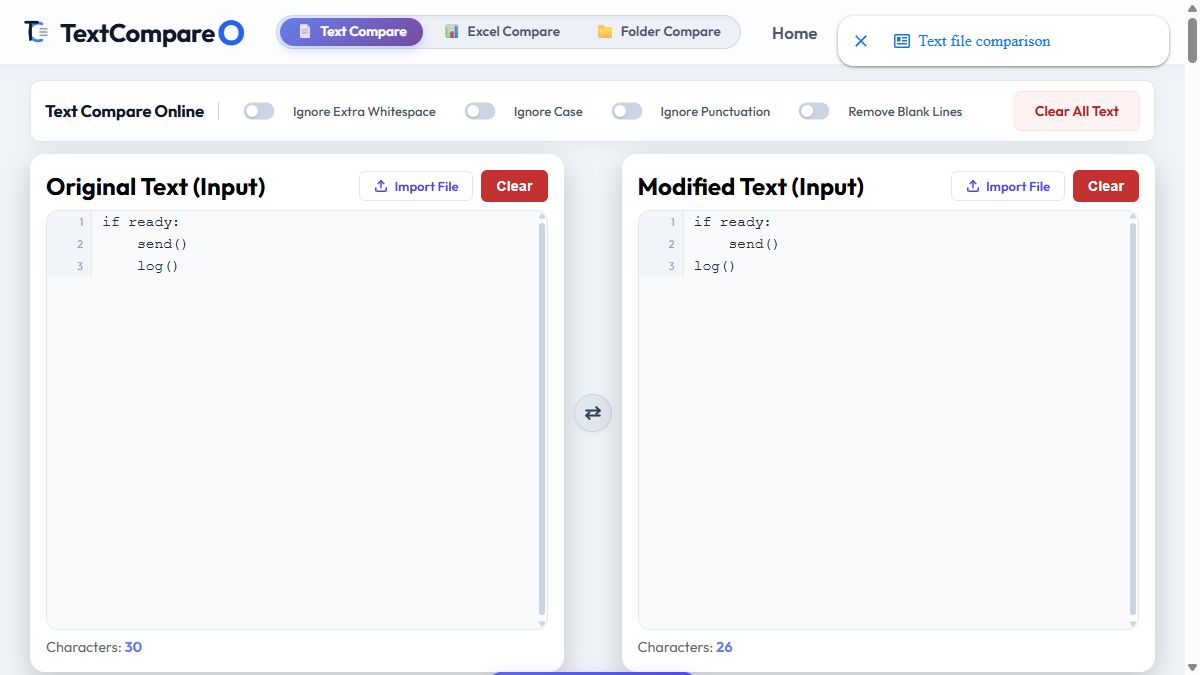
The live result still reported 100% similarity in both runs. It also displayed “Files are identical.” That message described the normalized comparison, not Python behavior or original source equality.
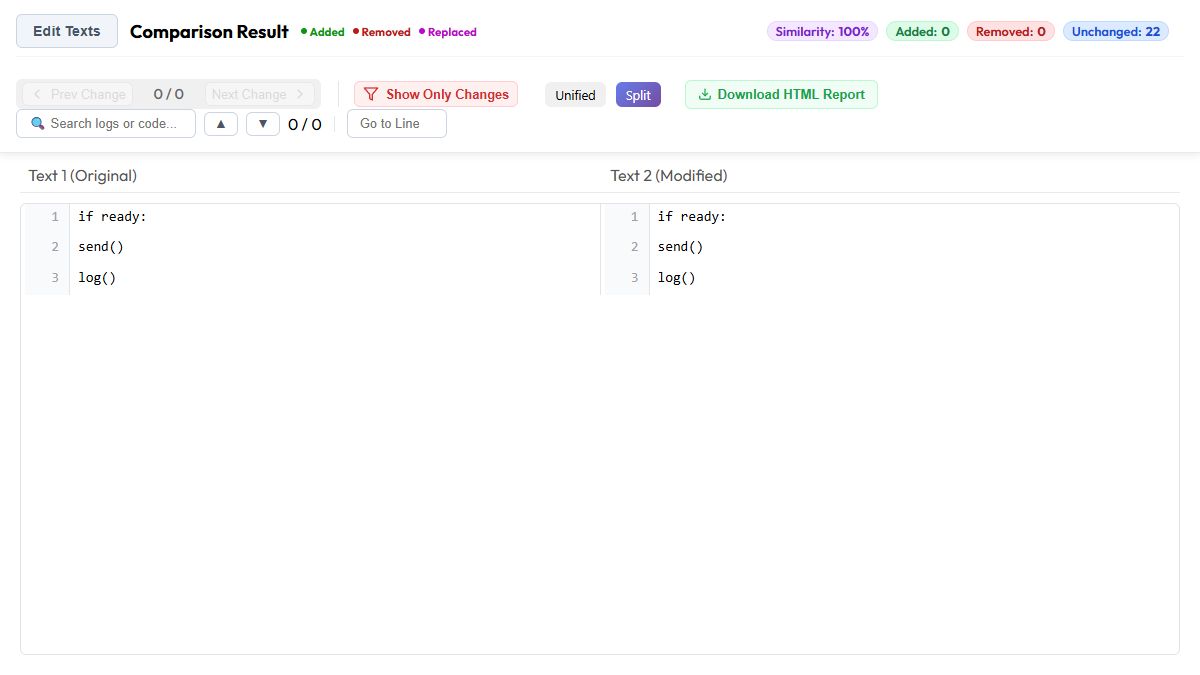
Python uses indentation to group statements. In the second version, log() is outside the conditional block. Review this source in a diff that preserves indentation, then check its behavior. This browser result cannot approve that change.
4. A case-sensitive identifier changes
Original: UserID: 42
Modified: userid: 42
With Ignore Case OFF, the interface showed Added 1, Removed 1, and 75% similarity. With it ON, the result became 100%, with zero additions and removals.
This can help during a wording pass, but it is a poor approval rule for identifiers that must preserve case. Check the system's actual naming rules before accepting the edit.
5. A comma disappears
Original: Yes, proceed.
Modified: Yes proceed.
Ignore Punctuation OFF showed one removal and 96% similarity. Turning that control ON produced zero reported changes and 100% similarity.
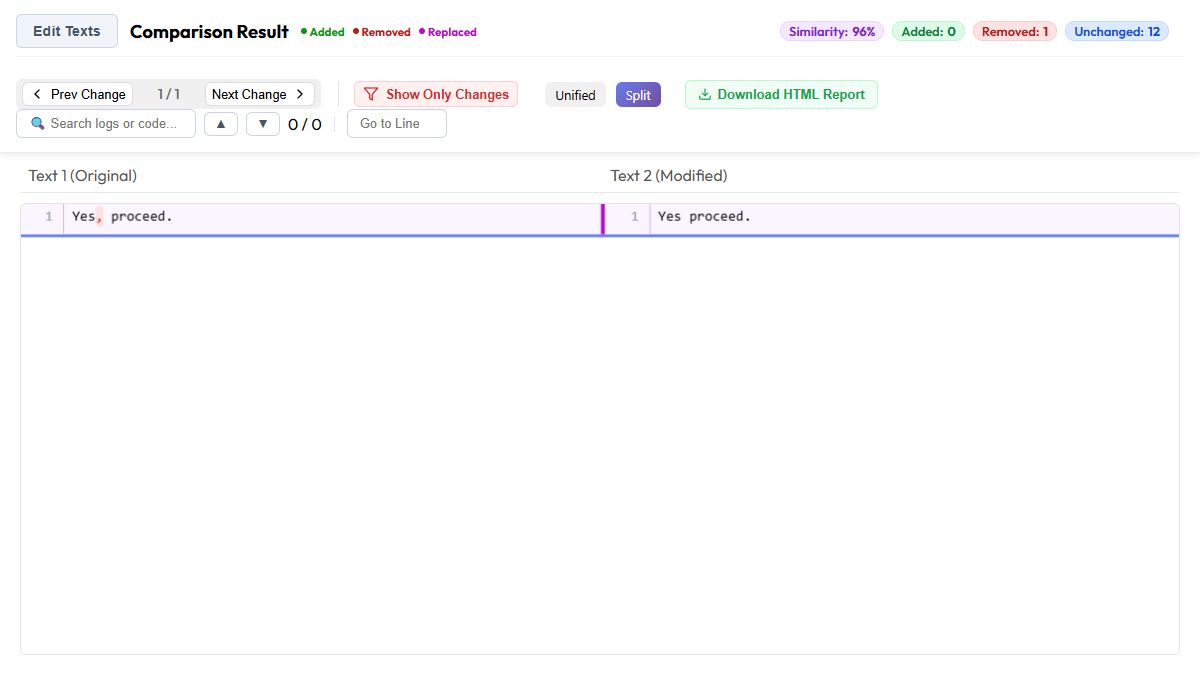
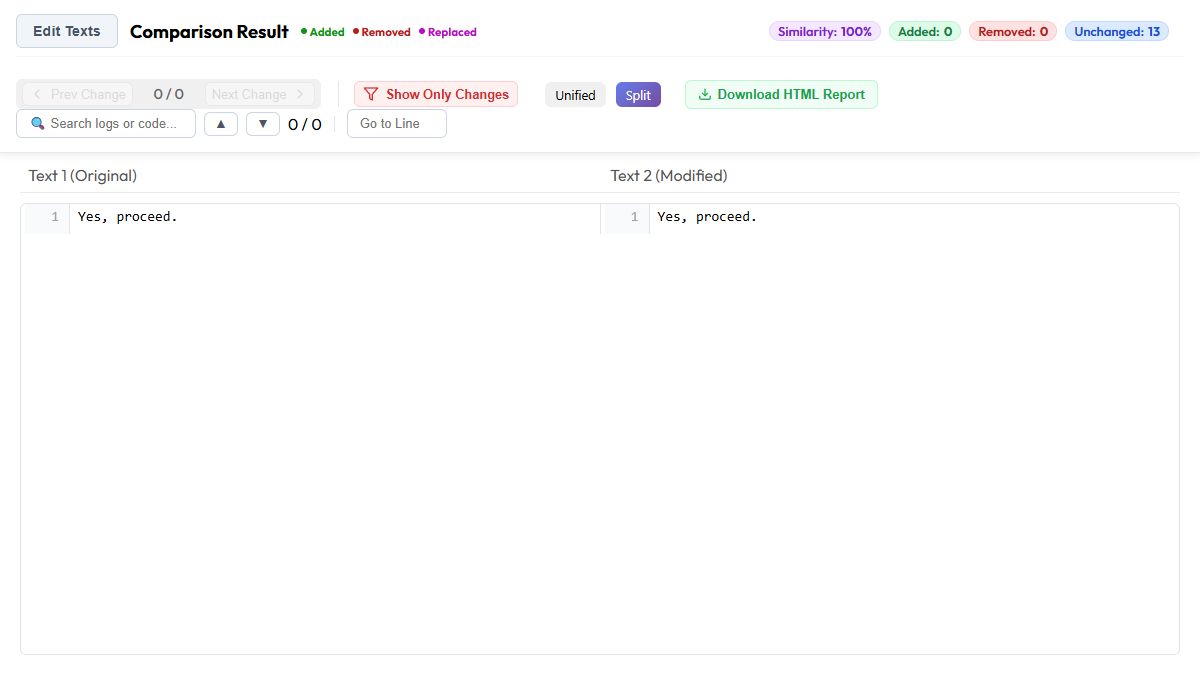
If punctuation is part of your review, keep this control OFF. A clean filtered result does not mean the punctuation was unchanged.
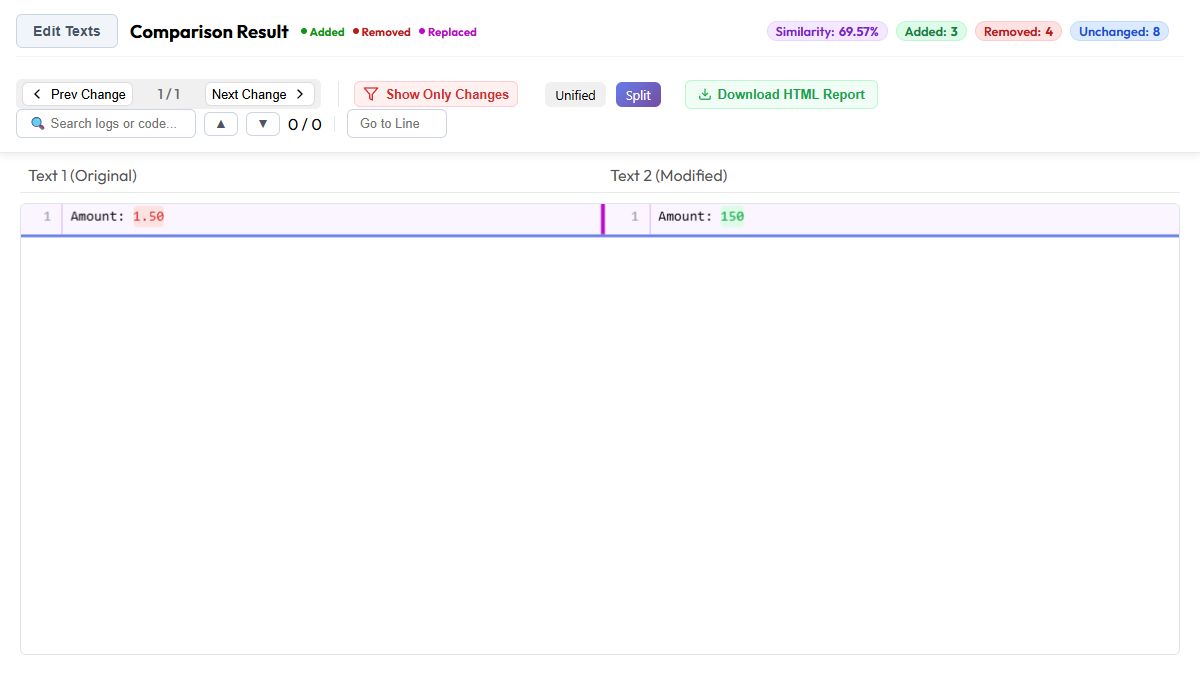
6. A decimal point disappears
Original: Amount: 1.50
Modified: Amount: 150
Both runs showed Added 3, Removed 4, and 69.57% similarity. Ignore Punctuation did not hide this decimal edit. A result for a comma cannot predict the behavior of every other symbol.
7. A blank line disappears
Original: Section one\n\nSection two
Modified: Section one\nSection two
Here, \n represents an actual line break in the pasted input. Both runs reported 100% similarity. Turning Remove Blank Lines OFF did not make this sample an exact paragraph-spacing check.
8. A sentence gains an internal line break
Original: The parcel arrives tomorrow.
Modified: The parcel arrives\ntomorrow.
We pasted a real line break before tomorrow., rather than letting the browser wrap the display. Both runs reported 100% similarity. The tested interface has no separate Ignore Line Breaks checkbox. Inspect paragraph boundaries in the originals when they matter.
9. A nonbreaking space replaces a normal space
Original: Order[U+0020]total
Modified: Order[U+00A0]total
The bracketed labels make the characters visible here. The tool received the real characters: a normal space and a nonbreaking space. Both runs returned 100% similarity.
These characters can look alike while remaining distinct in the source. For that broader problem, read our guide to text encoding and invisible differences.
A practical workflow for comparing text
- Keep both originals. Work on copies. Do not strip spacing from your only source files.
- Choose the review goal. Decide whether you are checking wording, punctuation, source structure, or exact file identity.
- Paste a small known difference. Use the online text comparison tool to see whether your target edit remains visible.
- Change one control at a time. Compare again and note which differences disappear.
- Read the highlighted text. Use the result alongside the originals, rather than approving from the score alone.
- Check source-sensitive details separately. For indentation or exact spacing, use an unfiltered source comparison with whitespace visible. For byte identity, compare the original file bytes.
For a longer review, our guide to character, word, and line-level diffs explains how the display granularity changes what you see. The guide to what a similarity score measures explains why a percentage needs context.
What about PDF text and spreadsheets?
PDF extraction can introduce line breaks or lose layout details. Use the PDF comparison tool when starting with PDFs, and check the source pages as well as extracted wording. Scanned pages need usable OCR text before text comparison can help.
For workbooks, use Excel comparison to review spreadsheet content in its cell context. A pasted text fragment cannot stand in for a full workbook review. Choose the comparison surface that matches the files you actually have.
Frequently Asked Questions
Can diff ignore whitespace?
Yes. Many diff tools can disregard selected whitespace differences. The rules vary: trimming line edges, collapsing extra spaces, and ignoring all spaces are different operations. Test a known change before relying on the setting.
How can I ignore whitespace in VS Code diff?
In VS Code settings, search for diffEditor.ignoreTrimWhitespace and enable it to ignore leading and trailing whitespace in comparisons. Set it to false when checking those differences. It is a trim rule, not a promise to ignore every space inside a line.
How to ignore white space in git diff?
Use git diff -b to ignore changes in whitespace amount, or git diff -w to ignore whitespace when comparing lines. Use git diff --ignore-blank-lines for changes whose lines are all blank. Keep an unfiltered comparison available for source review.
What does whitespace mean?
Whitespace means spacing characters, such as spaces, tabs, and line breaks. They can separate words or arrange text. Some formats also use them to define structure, so a whitespace change is not always a harmless visual edit.
Does ignore whitespace also ignore line breaks?
That depends on the tool and comparison mode. In our live sentence-reflow test, TextCompareo reported 100% similarity with Ignore Extra Whitespace both OFF and ON. This does not establish that all line-break changes will disappear.
Does 100% similarity mean the files are identical?
No. A normalized text result can show 100% even when the original spacing, case, or punctuation differs. In these tests, the identical-files message also appeared for normalized matches. Use a byte comparison of the original files when exact identity is required.
Test notes and sources
These are 18 live browser comparisons of nine synthetic input pairs, plus repeat checks of the comma and indentation examples. All screenshots show the real TextCompareo interface. We closed the identical-files message before capturing result views. The tests cover these samples on the stated date, not every language, file type, or future version.