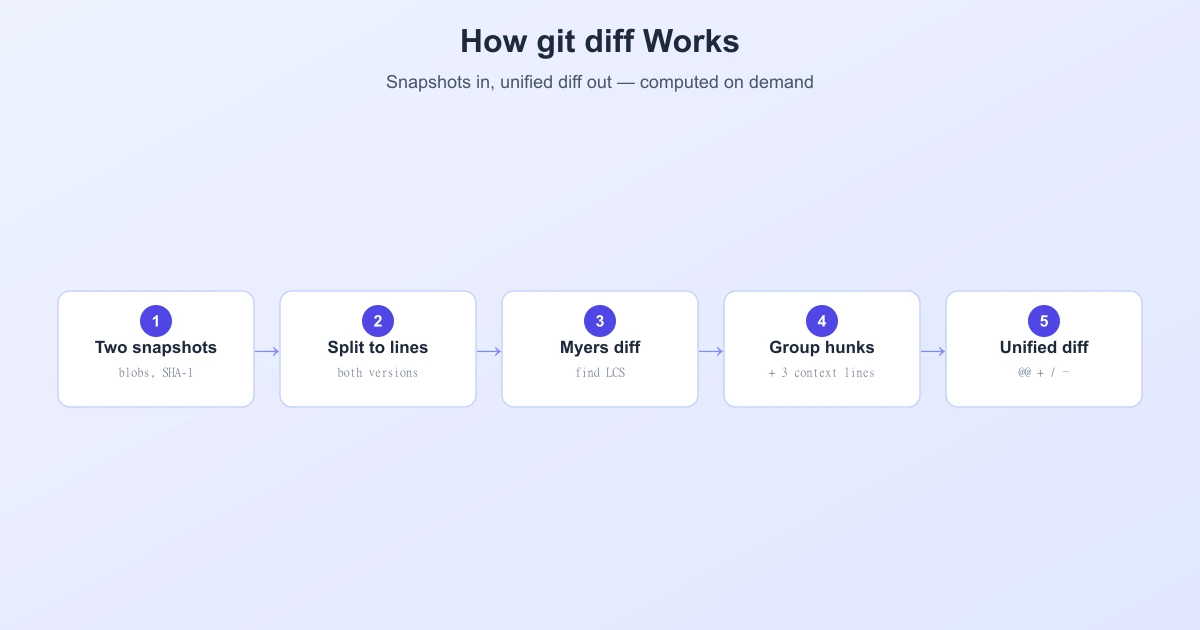
git diff does not read a stored list of changes — Git never saves diffs. Instead, it stores full snapshots of your files and computes the difference on the spot, every time you ask. It lines up the two versions, runs the Myers algorithm to find the shortest set of edits, groups those edits into hunks with a few lines of context, and prints the result in unified diff format. This guide walks through exactly what happens between typing git diff and seeing the coloured output.
Git Stores Snapshots, Not Diffs
This is the idea that unlocks everything else. Unlike some older version-control systems that store changes between versions, Git stores each version of a file as a complete blob — the full content, compressed. Every blob is named by the SHA-1 hash of its content, so identical content always gets the same name.
Because Git keeps whole snapshots rather than diffs, the diff you see is generated fresh each time. That sounds wasteful, but it is what makes Git fast and flexible: it can diff any two points in history on demand, and it can instantly skip files that have not changed.
What Happens When You Run git diff
Here is the pipeline, step by step:
- Pick the two sides. Git first decides what it is comparing. Plain
git diffcompares your working tree against the staging area (index);git diff --stagedcompares the index against the last commit;git diff A Bcompares two commits. - Fetch the blobs. For each file, Git gets the two versions as blobs.
- Skip unchanged files instantly. If the two blobs have the same SHA-1 hash, the content is identical — Git skips the file without looking inside it. This is why
git diffis fast even in huge repositories. - Run the diff algorithm. For files that changed, Git splits both versions into lines and runs the Myers algorithm (its default) to find the shortest edit script — the fewest line insertions and deletions, which is the same as finding the longest common subsequence.
- Group edits into hunks. Consecutive changes are bundled into "hunks," each wrapped with 3 lines of unchanged context (configurable with
-U) so you can see where the change sits. - Format as a unified diff. Finally Git prints each hunk with a header like
@@ -12,7 +12,8 @@and marks lines with-(removed),+(added), or a space (context).
The Three Things git diff Can Compare
| Command | Compares | Answers |
|---|---|---|
git diff | Working tree vs. index | What have I changed but not staged? |
git diff --staged | Index vs. last commit | What will the next commit include? |
git diff A B | Two commits/branches | What changed between these points? |
Reading the Hunk Header
The cryptic line at the start of each hunk is more readable than it looks:
@@ -12,7 +12,8 @@ int main() {
   ^^^^  ^^^^
   old   new
   file  file
-12,7 means "starting at line 12 of the old file, 7 lines are shown," and +12,8 means "starting at line 12 of the new file, 8 lines are shown." The extra text after the second @@ is the nearest enclosing context (here, the function the change lives in) — a nice touch Git adds to help you orient.
How Git Detects Renames
Here is a surprise: Git does not actually record renames. When you rename a file, Git just stores a new tree that points to the same blob under a new name — the content hash is unchanged. So how does git diff show "renamed"?
It guesses, using a similarity heuristic. When rename detection is on (-M), Git compares deleted and added files and computes a similarity score. If a deleted file and an added file are similar enough — say -M90% means at least 90% unchanged — Git reports it as a rename instead of a separate delete and add. This is inference, not recorded history, which is why occasionally a rename shows up as a delete-plus-add.
Choosing the Diff Algorithm
Myers is the default, but Git lets you switch:
--myers— the default; shortest edit script.--patience— anchors on unique lines for cleaner code diffs. See patience vs. Myers.--histogram— a faster refinement of patience; often the best all-round choice for code.--minimal— spends extra time to guarantee the smallest possible diff.
Set a default with git config --global diff.algorithm histogram if you review a lot of source code.
The Same Idea in Any Diff Tool
Whether it is Git in your terminal or a browser tool you use to compare text online, the core is the same: line the two versions up, find the longest common part, and show everything else as added or removed. Git wraps that core in its snapshot model, hunks, and rename detection, but the beating heart is the same Myers/LCS diff that powers text comparison everywhere.
Frequently Asked Questions
Does Git store diffs or full files?
Full files. Git stores each version as a complete, compressed snapshot (a blob) identified by its content hash. Diffs are computed on demand when you run git diff, not stored.
What algorithm does git diff use?
By default, the Myers algorithm, which finds the shortest edit script between two versions. You can switch to --patience, --histogram, or --minimal for different trade-offs.
What does @@ -12,7 +12,8 @@ mean in git diff?
It is the hunk header. -12,7 means the hunk starts at line 12 of the old file and spans 7 lines; +12,8 means it starts at line 12 of the new file and spans 8 lines. Any text after it is the nearest enclosing context, like a function name.
How does git diff detect renames?
Git does not record renames; it infers them. With rename detection on (-M), it compares deleted and added files by content similarity and reports a rename when they are similar enough (e.g. -M90% for 90% unchanged).
What is the difference between git diff and git diff --staged?
git diff shows changes in your working tree that are not yet staged; git diff --staged (or --cached) shows what you have staged and will go into the next commit.
Why is git diff so fast on large repositories?
Because Git compares content hashes first. If two versions of a file share the same SHA-1 hash, the content is identical and Git skips it entirely without running the diff algorithm — so it only does real work on files that actually changed.
Related Reading
Compare Two Versions Instantly
No repo needed — paste two versions of any text or code and see a clean diff in seconds. Free and private.
Try TextCompareo