Every diff algorithm needs to know one thing before it starts: what counts as a unit? Feed it lines and it reports which lines changed. Feed it words and it points at the exact words. Feed it characters and it can show a single altered letter. The algorithm barely changes — but the answer you get, and how readable it is, changes completely. This guide covers the three granularity levels, what each is good and bad at, and the hybrid approach almost every modern tool actually uses.
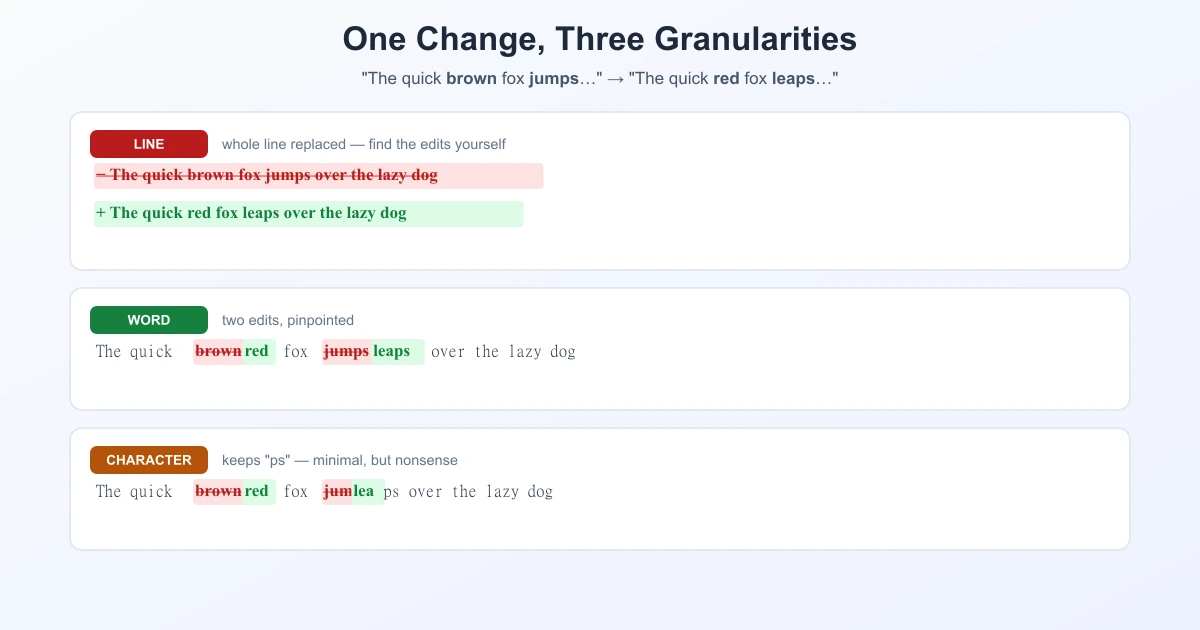
The Same Change, Three Ways
Take one sentence with two edits:
before:  The quick brown fox jumps over the lazy dog
after:   The quick red   fox leaps over the lazy dog
Line-level says: this line was removed, that line was added. Accurate, and it tells you almost nothing — you still have to find the two edits yourself.
- The quick brown fox jumps over the lazy dog
+ The quick red fox leaps over the lazy dog
Word-level says: brown → red, jumps → leaps. Two edits, pinpointed, and the seven unchanged words stay quiet.
The quick [-brown-]{+red+} fox [-jumps-]{+leaps+} over the lazy dogCharacter-level goes further and often too far. Comparing jumps with leaps character by character, it notices that both contain p and s, so it may report "keep the p, keep the s, change the rest" — technically minimal, practically unreadable.
Line-Level: The Default, and Why
Nearly every code tool defaults to lines. There are three solid reasons.
- A line is a real unit in code. One statement, one line. Changing a line is a meaningful event; changing a word inside it usually is too, but the line is the unit humans reason about.
- Patches need lines. The unified diff format is line-based, and so is every tool that applies patches. A word-level diff is a view; a line-level diff is a transferable change.
- It is far cheaper. More on that below.
The weakness is obvious the moment you edit prose: fix one typo in a 200-word paragraph written as a single line, and the entire paragraph shows as removed and re-added.
The Performance Argument
This is the reason granularity is not just a style preference. Diff algorithms scale with the number of units, not the number of bytes. The classic dynamic-programming approach is O(m × n) in the unit counts, and even the efficient Myers algorithm is O(ND) — still driven by how many units there are.
For a modest 1,000-line file:
| Granularity | Units to compare | Relative cost |
|---|---|---|
| Line | ~1,000 | baseline |
| Word | ~10,000 | ~10× more units |
| Character | ~60,000 | ~60× more units |
Since cost grows faster than linearly with unit count, running a character-level diff across a whole large file is not a small ask. That is a second, quieter reason line-level won as the default.
The Hybrid Everyone Actually Uses
Here is the part that is rarely spelled out. Modern tools do not pick one granularity — they layer two:
- Run a line-level diff first. Cheap, and it finds which regions changed.
- Then re-diff at word or character level, but only inside those changed lines.
You get word-level precision where it matters, while paying the character-level cost on a handful of lines instead of the whole file. This is exactly how Git implements --word-diff: it takes the same line-by-line diff produced without the option and computes word-by-word changes within each hunk. The line diff is not replaced; it is refined.
The same layering is what produces intra-line highlighting — the coloured fragments inside a changed line on GitHub and GitLab pull requests. The line is marked by the first pass, the exact fragment by the second.
Doing It in Git
# word-level, with [-removed-] {+added+} markers
git diff --word-diff

# word-level, colour only — usually easier to read
git diff --color-words

# character-level: treat every single character as a word
git diff --word-diff-regex=.

# custom unit — e.g. split on non-alphanumerics
git diff --word-diff-regex='[A-Za-z0-9]+'
That last flag is the interesting one: --word-diff-regex lets you define the unit. Set it to . and you get character granularity; set it to a token pattern and you get something closer to how a language parser would split the text.
Which Granularity to Use
| Use | When | Watch out for |
|---|---|---|
| Line | Code review, patches, large files | Long lines hide small edits |
| Word | Prose, documentation, contracts, translations | Cannot be applied as a patch |
| Character | Single values: IDs, hashes, URLs, numbers | Noisy and slow on real text |
A useful rule of thumb: match the granularity to the unit a human would name. Reviewing code, you say "this line changed". Reviewing a contract, you say "this word changed". Checking an API key, you say "this character is wrong". Pick the level that matches the sentence you would speak.
A Note on the Word "Distance"
Granularity also decides what a similarity score means. Levenshtein distance is normally defined over characters — "three edits apart" means three characters. Compute the same idea over words and "three edits" means three words. Same algorithm, very different number, so any similarity percentage is only meaningful once you know the unit behind it.
In Practice
When you compare text online with TextCompareo, the result is word-level: whole lines are marked as changed, and within them the exact added, removed, and replaced words are highlighted. That is the layered approach described above, and it suits the mixed content people actually paste — part prose, part config, part code. For more on how that pipeline fits together, see how Smart Text Compare works, and for the algorithms doing the matching, patience vs. Myers.
Frequently Asked Questions
What is the difference between word-level and line-level diff?
A line-level diff treats each line as one unit and reports whole lines as added or removed. A word-level diff splits the text into words and highlights exactly which words changed, so a small edit inside a long line is pinpointed instead of marking the entire line.
Why do most diff tools default to line-level?
Three reasons: a line is a natural unit in code, patch formats such as the unified diff are line-based so patches can only be applied line by line, and comparing lines is far cheaper than comparing thousands of words or tens of thousands of characters.
How do I see a word-level diff in Git?
Run git diff --word-diff for markers like [-old-]{+new+}, or git diff --color-words for a colour-only version that is usually easier to read.
Can Git do a character-level diff?
Yes — git diff --word-diff-regex=. treats every character as a word, giving character-level granularity. It is useful for single values like hashes or IDs, but noisy on ordinary text.
Is a word-level diff slower than a line-level one?
Comparing words means roughly ten times more units than lines, and characters roughly sixty times more, so yes in principle. In practice tools avoid the cost by running a line diff first and refining only the changed lines at word level.
What is intra-line highlighting?
It is the coloured fragment shown inside a changed line in tools like GitHub and GitLab. It comes from the hybrid approach: a line-level pass finds the changed lines, then a word or character pass highlights the exact fragment within them.
Which granularity should I use for prose?
Word-level. Prose lines are long, so a line diff marks a whole paragraph as changed for a single edited word. Word-level shows precisely which words moved — the reason it suits documentation, contracts, and translations.
Sources
Related Reading
See Word-Level Diff in Action
Paste two non-sensitive versions and inspect the exact changed words without signing up.
Try TextCompareo