The unified diff format is the standard way computers write down "what changed between two files." It is what you see in git diff, in a pull request, and inside a .patch file. Once you know its four pieces — the file headers, the @@ hunk header, the +/-/space prefixes, and the context lines — you can read any diff at a glance. This guide decodes each one, including the numbers in @@ -12,7 +12,8 @@ that most people skip over.
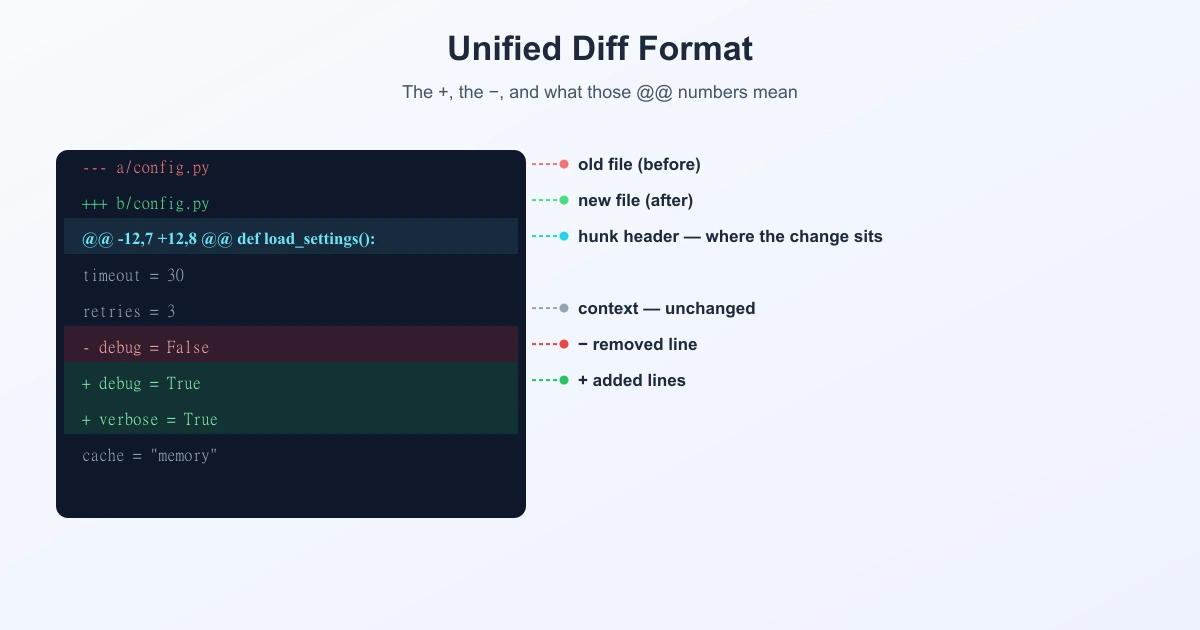
A Complete Example, Line by Line
Here is a small but complete unified diff. Every element of the format appears in it:
--- a/config.py
+++ b/config.py
@@ -12,7 +12,8 @@ def load_settings():
     timeout = 30
     retries = 3
-    debug = False
+    debug = True
+    verbose = True
     cache = "memory"
     region = "us-east-1"
In plain English: in config.py, one line was removed (debug = False) and two were added (debug = True and verbose = True). Everything else you see is untouched context. Now here is how each part says that.
1. The File Headers: --- and +++
--- a/config.py     ← the OLD version
+++ b/config.py     ← the NEW version
Three dashes mark the original file; three pluses mark the changed file. The a/ and b/ prefixes are a Git convention meaning "side A" (before) and "side B" (after) — they are not real folders.
A handy memory hook: minus is what you had, plus is what you get. That same logic carries through the whole format.
2. The Hunk Header: Decoding @@ -12,7 +12,8 @@
A hunk is one changed region of the file. Its header tells you exactly where that region sits in both versions. The syntax is:
@@ -<old start>,<old count> +<new start>,<new count> @@ optional headingSo in our example, @@ -12,7 +12,8 @@ reads as:
| Part | Means |
|---|---|
-12,7 | In the old file: start at line 12, and this hunk covers 7 lines |
+12,8 | In the new file: start at line 12, and this hunk covers 8 lines |
def load_settings(): | Optional hint: the nearest enclosing section, so you know where you are |
The counts are a useful sanity check. The old side spans 7 lines and the new side spans 8, and the difference of one matches what happened: one line removed, two added, so the file grew by one line.
One quirk worth knowing: if a count is 1, many versions of GNU diff drop it entirely. So @@ -5 +5,3 @@ simply means the old side is a single line starting at 5.
3. The Line Prefixes: +, -, and Space
Every line inside a hunk starts with one character, and that first character is the whole message:
-— this line was removed from the old version.+— this line was added in the new version.(space)— this line is unchanged; it appears in both, shown only for context.
Notice there is no "modified" marker. A changed line is expressed as a removal followed by an addition — which is exactly why the old debug = False and the new debug = True appear as a - line and a + line, not as one "edited" line.
That single detail explains a lot of confusion. A one-word edit still shows two lines in a unified diff.
4. Context Lines: the Quiet Ones
The space-prefixed lines around the change are context. By default a diff shows three lines of context above and below each hunk, which is enough to recognise where the change is without printing the whole file.
You can change it. git diff -U10 (or diff -U10) gives ten lines of context, useful when a change is hard to place. -U0 strips context entirely and shows only the changed lines — compact, but harder to read and riskier to apply as a patch.
Context has a second job beyond readability: when a patch is applied to a file that has drifted slightly, the patch tool uses those surrounding lines to find the right spot. More context makes a patch more likely to apply cleanly.
Where You Will Meet This Format
- git diff and git show — the default output in your terminal.
- Pull requests — GitHub, GitLab and Bitbucket render this same data visually.
- .patch and .diff files — emailed or shared changes applied with
git applyorpatch. - Code review tools and CI logs — where failures often print a diff.
The format dates back to GNU diff in the late 1980s and has barely changed since, which is why it appears everywhere and why learning it once pays off for years.
Unified vs. Side-by-Side
| Unified | Side-by-side | |
|---|---|---|
| Layout | One column, changes inline | Two columns, old vs new |
| Best for | Terminals, patches, narrow screens | Reading long rewrites, wide screens |
| Machine-readable | Yes — can be applied as a patch | No — a display style only |
They show the same information in different shapes. Unified is the transferable one, because a unified diff is not just a picture of the change — it is the change, in a form another machine can apply.
Reading a Diff Faster
- Read the hunk header first. The section hint after the second
@@tells you which function or block you are looking at. - Scan the prefixes, not the text. The shape of a hunk — a block of
-followed by a block of+— usually tells you the story before you read a word. - Pair up the minus and plus lines. A
-immediately followed by a similar+is almost always one edited line. - Increase context when lost.
-U10shows more surrounding code and often makes the intent obvious.
What Produces These Hunks
The format is only the presentation layer. The decision about which lines count as added or removed comes from a diff algorithm — by default the Myers algorithm, with patience and histogram available when you want cleaner alignment in code. If you want the full pipeline from stored file to coloured output, see how git diff works under the hood. And if you would rather see two versions compared visually, you can compare text online and read the changes side by side instead.
Frequently Asked Questions
What does @@ mean in a diff?
It marks a hunk header — the start of one changed region. The numbers between the @@ markers give the starting line and line count for the old file (after -) and the new file (after +).
What does @@ -12,7 +12,8 @@ mean?
The hunk starts at line 12 of the old file and covers 7 lines there, and starts at line 12 of the new file and covers 8 lines there. The file grew by one line in this region. Any text after the second @@ is a hint about the enclosing section, such as a function name.
What do + and - mean in a diff?
- means the line was removed from the old version, + means it was added in the new version, and a leading space means the line is unchanged and shown only for context.
Why is a changed line shown as both - and +?
Unified diff has no "modified" marker. Any edit is recorded as removing the old line and adding the new one, so a single-word change appears as one - line followed by one + line.
What do the a/ and b/ prefixes mean?
They are a Git convention: a/ is the original version of the file and b/ is the modified version. They are labels, not real directories.
How many context lines does a unified diff show?
Three by default, above and below each hunk. Change it with -U, for example git diff -U10 for ten lines of context or -U0 for none.
What is the difference between unified and side-by-side diff?
Unified shows changes inline in a single column and can be applied as a patch. Side-by-side puts the old and new versions in two columns, which is easier to read for large rewrites but is a display format only.
Related Reading
Prefer to See Changes Side by Side?
Paste two versions of any file or code and read every change visually — free, private, no signup.
Try TextCompareo