A text similarity score tells you how much of two documents lined up, in order. It does not tell you whether they still mean the same thing. Those sound close enough to be the same question, and they are not. We ran five comparisons to show how far apart they can get, and the worst case scored 97.96% while the sentence reversed its legal meaning.
What the number is actually counting
Run any comparison on this site and you get four figures: similarity, added, removed and unchanged. The first is derived from the others, and the relationship is simple arithmetic.
In one test we ran, a comparison reported 206 unchanged characters and 68 added. The score it displayed was 75.18%. That is exactly what you get from:
206 / (206 + 68) = 0.7518 = 75.18%So the score is the share of text the algorithm managed to align in sequence. Nothing in that calculation looks at meaning, importance, or which words carry weight. A digit counts the same as a paragraph. The word "not" counts the same as a comma.
Once you know that, the strange results stop being strange.
Five tests
We compared five pairs on the live tool with default options and nothing ignored. Two of the pairs changed what the document means. Three did not.
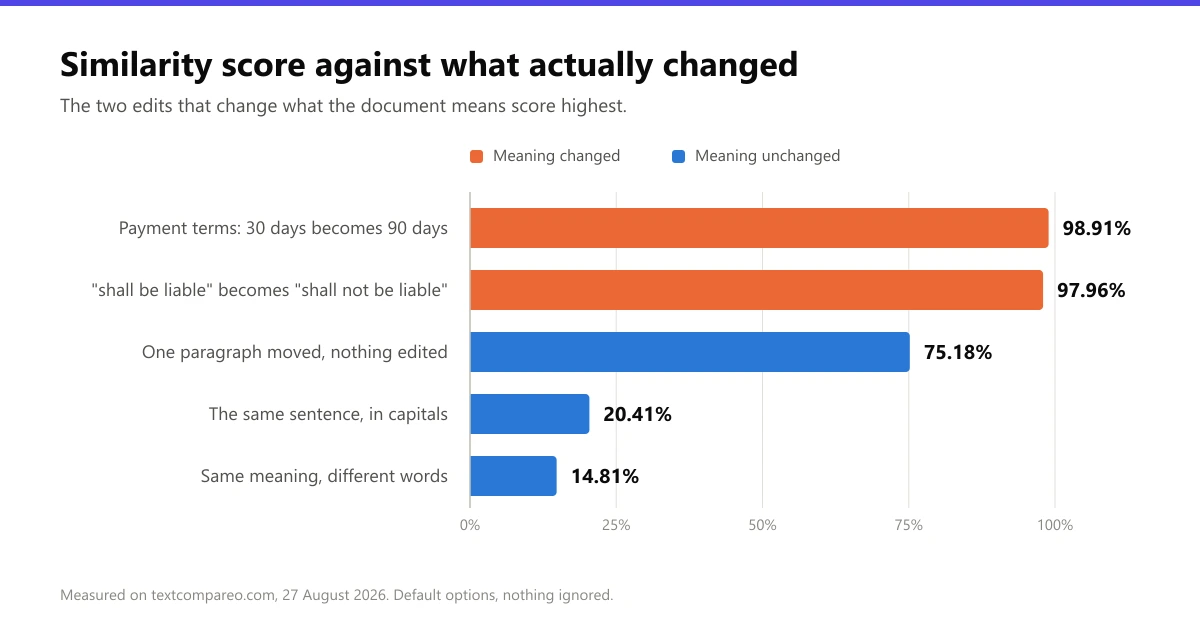
The ranking is close to upside down.
98.91%: Payment terms changed
A services agreement where the client pays within 30 days became one where the client pays within 90 days. Two characters differ. For anyone managing cash flow, tripling the payment window is a serious change, and the score barely moves.
97.96%: Liability reversed
One clause read "the Provider shall be liable for any indirect or consequential loss". The revised version read "the Provider shall not be liable". Four characters were added and nothing was removed.
This is the clearest case. A single word flips who carries the risk, and the score reports the two clauses as almost identical, because by its own definition they are.
75.18%: A paragraph moved
Nothing was edited at all. One section moved from fourth position to first, and both versions hold exactly the same 286 characters. The score dropped by a quarter for an edit that changed nothing. We covered this case in detail in why diff tools show moved text as deleted and re-added.
20.41%: The same sentence in capitals
"Refunds are available within 30 days of purchase." against the same sentence in capitals. Identical words, identical meaning, and a score under a quarter. Character comparison treats R and r as different characters, so almost every letter registers as changed.
Turning on Ignore Case fixes this one, which makes it the only case here that a setting solves.
14.81%: The same thing, said differently
"Refunds are available within 30 days of purchase." against "You can request your money back up to a month after buying." Same policy, different words. The lowest score of the five went to the pair that a human would call equivalent.
Why it works this way
The score is built on sequence alignment, usually a longest common subsequence pass. That algorithm answers one question well: what is the longest run of characters or lines these two texts share, in order? Everything outside that run is an edit.
It is a good algorithm for the job it has. The job just is not the one people assume. Meaning lives in which words changed, not how many. No character-counting method can weigh "not" more heavily than "the", because it has no idea what either one does.
This is also why the score punishes reformatting so hard. Capitalisation, rewording and reordering all move a lot of characters while moving no meaning. A single negation moves almost no characters while moving all of it.
When the score is genuinely useful
It would be unfair to write the number off. It answers its own question reliably, and that question is worth asking in a few situations.
A score near 100% is a useful triage signal on a large document. It tells you the two versions are structurally the same and the edits are small and local, which is exactly when a careful read of the highlighted parts pays off.
A very low score on files you expected to match is also informative. It usually means something went wrong upstream: the wrong file, a failed text extraction, or an encoding problem. Our piece on why identical-looking text compares as different covers that last one.
Tracking the score across many document pairs can also surface outliers worth a human look. What it cannot do is decide, on its own, whether one pair is safe to approve.
How to read it properly
Read the counts, not just the percentage. Added and removed tell you far more. Equal counts usually mean a move. A tiny added count with a high score can still be the most important edit in the document, as the liability clause shows.
Never approve on the score alone. For anything with money or obligations in it, read the highlighted changes. A 99% score is the situation where a critical edit is easiest to miss, because the number is reassuring and the change is small.
Normalise before you compare when formatting is noise. If one version came back in a different case or with different spacing, turn on the ignore options first. That removes the differences you do not care about so the score reflects the ones you do.
Treat a low score as a question, not an answer. It might mean a rewrite, or a reorder, or the wrong file entirely. The three lowest scores in our tests all came from pairs that meant the same thing.
The short version
A similarity percentage measures aligned text. People read it as measuring preserved meaning. Those two things drift apart most at exactly the moment it matters, which is a small, deliberate edit inside a long document.
Use the number to decide how carefully to read. Do not use it to decide whether to read. You can reproduce every test above on our text comparison tool in a couple of minutes.
Frequently Asked Questions
What does a text similarity score measure?
It measures how much of the two texts the algorithm aligned in sequence, expressed as unchanged characters divided by unchanged plus added. It does not measure whether the documents still mean the same thing.
Why is the similarity score high when an important word changed?
Because the score counts characters, not importance. Adding "not" to a liability clause changes four characters. In our test that scored 97.96%, even though the clause now says the opposite of what it said before.
Why is the similarity score low when nothing important changed?
Reformatting moves a lot of characters without moving meaning. The same sentence in capitals scored 20.41% in our test, and a reworded sentence with the same meaning scored 14.81%.
What is a good similarity percentage?
There is no threshold that means safe. A 99% score can hide a reversed clause and a 15% score can describe two versions that mean the same thing. Use the number to judge how much has moved, then read the highlighted changes.
How is the similarity percentage calculated?
Unchanged divided by unchanged plus added. In one of our tests the tool reported 206 unchanged and 68 added, and displayed 75.18%, which is exactly 206 divided by 274.
Can I make the score ignore capitalisation and spacing?
Yes. The Ignore Case, Ignore Extra Whitespace and Ignore Punctuation options normalise the text before comparison, which raises the score for pairs that differ only in formatting. They do not help with a moved block, because a move does not change any character.
Does a 100% score mean the documents are identical?
It means the algorithm aligned everything it counted. Invisible characters, encoding differences and trailing whitespace can still differ underneath, which is worth knowing when a comparison is being used as a check.