Move a paragraph from the bottom of a document to the top, change nothing else, and run a comparison. Almost every diff tool will report the paragraph as deleted in one place and added in another. Nothing was edited, but the tool shows two large changes. This is not a bug, and no setting fixes it. It happens because a line-based diff has no concept of a move.
Here is what that looks like with real numbers.
The test
We took a short refund policy and made one change: the "Processing time" section moved from fourth position to first. Not a word inside it was touched. Every other section stayed exactly where it was.
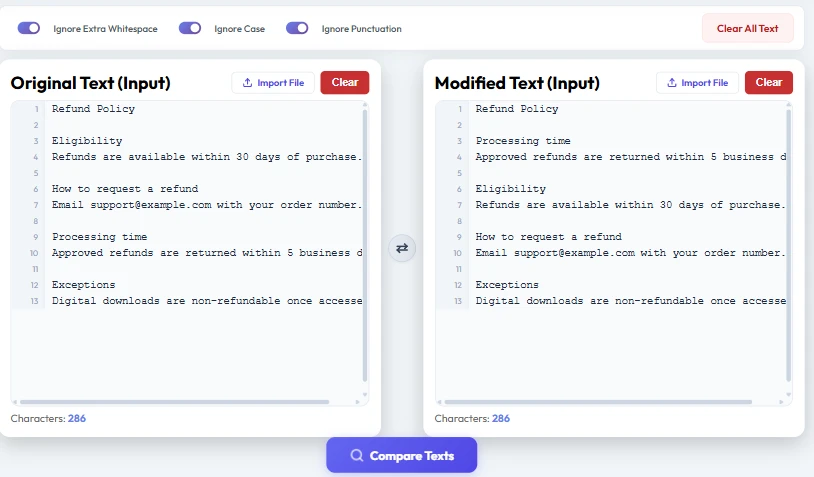
Both sides are 286 characters. We checked this properly rather than trusting the eye: sort the characters of each version and the two sequences are identical. Every letter, space and full stop on the left also exists on the right.
By any reasonable definition, no content changed.
What the comparison reported
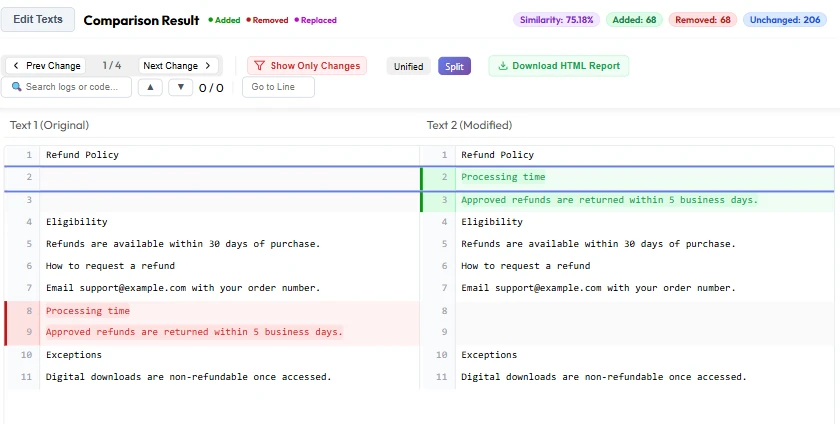
The result was 75.18% similar. Two documents holding exactly the same characters were reported as a quarter different.
Look closer at the counts and the reason becomes obvious:
| Metric | Value |
|---|---|
| Added | 68 |
| Removed | 68 |
| Unchanged | 206 |
| Similarity | 75.18% |
Added and removed are the same number, because they are the same text. That block of 68 characters was counted once as a deletion and once again as an insertion. The tool saw content disappear from line 8 and different content appear at line 2, and it had no way to connect the two.
Why the algorithm cannot see a move
Most diff tools are built on longest common subsequence. The algorithm walks both versions in order and finds the longest run of lines that appear in both, in the same sequence. Anything outside that run is reported as removed from the left or added to the right.
The phrase that matters is in the same sequence. LCS is allowed to skip lines, but it can never reorder them. So when a block jumps from position four to position one, it cannot be part of the common subsequence in both places at once. The algorithm keeps the longer match and reports the rest as two separate edits.
This is not a shortcut or an oversight. A move is genuinely ambiguous. If a paragraph appears at the top of the new version and an identical one is gone from the bottom, did somebody move it, or delete one and type another? The text alone cannot answer that. Myers' algorithm, which most tools including git use, is designed to find the shortest edit script. Two edits is the shortest honest answer it can give.
What the similarity percentage is really counting
The number is more literal than it looks. Take the unchanged characters and divide by the unchanged plus the added ones:
206 / (206 + 68) = 0.7518 = 75.18%That matches the displayed figure exactly. So the score is not measuring how similar the two documents are in meaning, or even in content. It measures how much of the text the algorithm managed to line up in order.
Worth keeping in mind when a percentage is doing serious work. A contract where one date changed will score very high while meaning something completely different. A contract with its clauses reordered will score low while meaning exactly the same thing. Neither is the score being wrong. It is the score answering a narrower question than the one you asked.
Do the ignore options help? No.
This is the part people expect to solve it, so it is worth testing rather than assuming. We turned on all three ignore options at once, Ignore Extra Whitespace, Ignore Case and Ignore Punctuation, and ran the identical comparison again.
| Metric | All options off | All three on |
|---|---|---|
| Similarity | 75.18% | 75.18% |
| Added | 68 | 68 |
| Removed | 68 | 68 |
| Unchanged | 206 | 206 |
Not a single figure moved.
The reason is simple once you see it. Those options normalise the text before comparison. They strip case, collapse runs of spaces, drop punctuation. All of that works on what the characters are. A move does not change what any character is. It changes where the line sits, and no amount of normalising touches position.
What actually helps
There is no toggle for this, but there are a few things that genuinely reduce the pain.
Compare in smaller pieces. If you know a section moved, compare that section against its old self on its own. Take the move out of the picture and what is left is the real edit, which is usually what you were looking for.
Separate the reorder from the rewrite. When you are the one making changes, move things in one commit or one saved version, and edit wording in another. Compare each step separately. This is the same reasoning behind splitting large pull requests into smaller ones, and it works on prose for the same reason.
Read the pair, not the colour. A large red block and a large green block holding identical text is a move, and it is usually recognisable at a glance once you know to look. The equal added and removed counts are the giveaway.
Use a structure-aware tool when structure is the point. For code, some tools do detect moved blocks. For prose, almost none do. If you regularly need move detection, that is a tool requirement, not a setting.
Where this catches people out
Contract review is the common one. A counterparty returns a document with clauses reordered and two words changed. The comparison lights up with large blocks, the two-word edit is buried in the noise, and it gets missed.
Documentation and policy updates hit it too. Reordering sections for readability is a normal edit, and it makes the next comparison much harder to read than the change deserved.
It also shows up in spreadsheet comparisons, where re-sorting rows produces exactly the same effect for exactly the same reason.
The short version
A diff tells you what the text is, not what somebody did to it. Moving a paragraph is an action, and the two documents alone do not record actions. The tool reads two states and reports the smallest set of edits that turns one into the other. For a move, that is always a delete plus an insert.
Once you know that, the output stops looking wrong. Two identical blocks in red and green mean something was moved, and you can move on to reading the changes that actually matter. You can try the same test yourself on our text comparison tool in under a minute.
Frequently Asked Questions
Why does my diff show moved text as deleted and added?
Because line-based diff algorithms compare two states of a document and report the smallest set of edits between them. A move is not one of the edits they can express. The block is reported as removed from its old position and added at its new one, which is technically accurate even though it does not describe what you did.
Can any setting make a diff detect moved text?
Not the usual ones. Ignore Case, Ignore Whitespace and Ignore Punctuation normalise what characters are, and a move does not change any character. In our test, turning all three on left every number identical, including the similarity score.
Why is the similarity score low when nothing changed?
The score measures how much text the algorithm aligned in order, not how similar the documents are in meaning. In our test, 206 characters aligned out of 274 counted, giving 75.18%, even though both versions held exactly the same 286 characters.
How can I tell a move from a real edit in a diff?
Compare the added and removed counts. When they match and the highlighted blocks contain the same words, you are looking at a move rather than a rewrite. Two identical blocks, one red and one green, are the clearest sign.
Do any diff tools detect moved blocks?
Some code-focused tools do, and git has options that help in narrow cases. Support for prose is far rarer. If move detection matters to your work, treat it as something to choose a tool for, rather than a setting you can switch on.
Does this affect Word and PDF comparisons too?
Yes. The file format makes no difference. Word documents, PDFs and spreadsheets are all converted to text before comparison, so a reordered section behaves the same way in each of them.
Is a low similarity score a sign the tool is broken?
No. The score is doing exactly what it was built to do, which is measure aligned text. It answers a narrower question than most people assume, so it is worth reading alongside the added and removed counts rather than on its own.