Comparing two JSON files looks like it should be easy. It usually is not. Two files can hold exactly the same data and still produce a diff full of red and green — or hold genuinely different data and produce almost nothing. The reason is a mismatch: JSON is a tree, but a text diff sees lines. This guide covers the traps that mismatch creates — key order, formatting, types, nesting, arrays — and the two standard ways to express a JSON difference properly.
The Root Cause: A Tree Compared as Lines
A line-based diff answers one question: which lines differ? That works beautifully for source code and prose, where a line is a meaningful unit. In JSON a line is an accident of formatting. The meaningful units are keys, values, and their position in a nested structure.
So when a text diff runs over JSON, it compares the serialization — the way the data happens to be written down — instead of the data itself. Every trap below comes from that one gap.
Trap 1: Key Order Does Not Matter (to JSON)
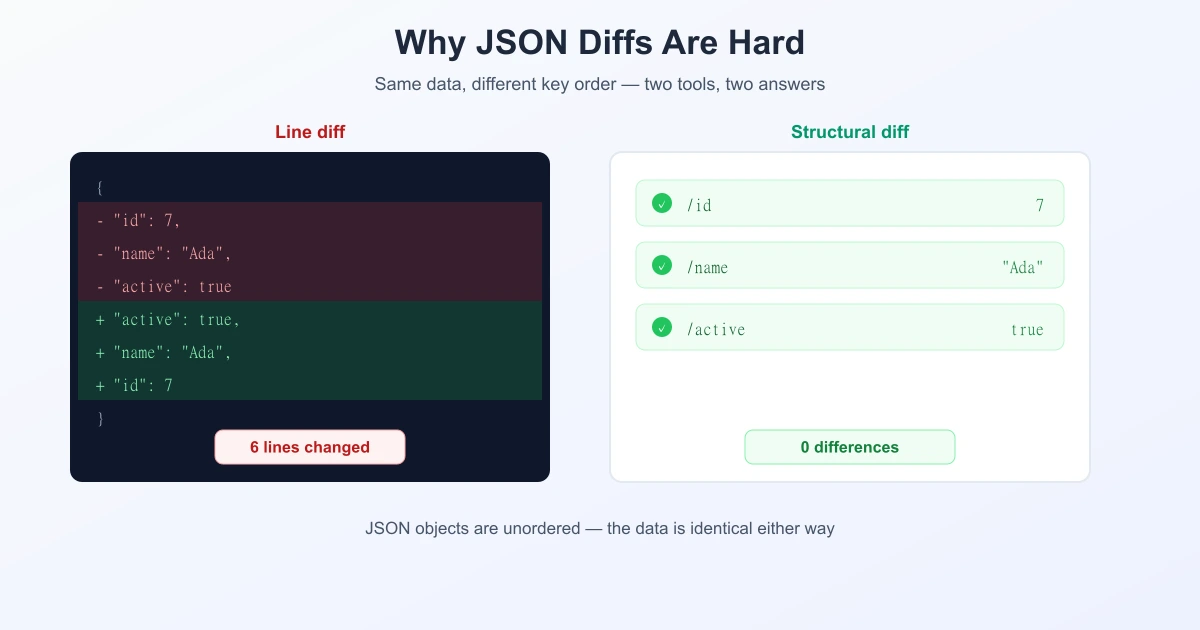
By the JSON specification, an object is an unordered collection of name/value pairs. These two objects are identical as data:
{ "id": 7, "name": "Ada", "active": true }

{ "active": true, "name": "Ada", "id": 7 }
A structural comparison reports no difference. A line diff reports that every line changed. Nothing is wrong with either tool — they are answering different questions.
This matters in practice because key order is rarely stable. Different languages, libraries, and API versions serialise object keys in different orders, so re-exporting the same record can shuffle them.
Trap 2: Array Order Does Matter
The mirror image of trap 1, and the one that catches people out. Objects are unordered; arrays are ordered. So this is a real difference:
{ "tags": ["a", "b"] } ≠ { "tags": ["b", "a"] }Whether it is a difference you care about is a separate question. If the array is really a set — a list of tags, permissions, or IDs — the order is meaningless to you but significant to JSON. Many tools offer an "ignore array order" option for exactly this, and it should be used deliberately, not by default.
Arrays have a second problem: insertion shifts everything after it. Add one element at the start of a 200-item array and a naive comparison can report all 200 as changed. Good diff tools handle this by matching elements rather than positions, the same idea behind the longest common subsequence used in text diffing.
Trap 3: Formatting Noise
Indentation, line breaks, and spacing carry no meaning in JSON, but they define what a line is — and therefore define the entire diff. Compare a minified file against a pretty-printed one and a line diff will report that everything changed, because the minified version is a single line.
This is the easiest trap to defuse: pretty-print both sides with the same settings before comparing.
Trap 4: Types and Number Representation
Some of the most dangerous JSON differences are nearly invisible:
| Looks like | Actually | Why it bites |
|---|---|---|
7 vs "7" | number vs string | A real change; strict consumers will break |
1.0 vs 1 | same number, different text | Text diff flags it; data is unchanged |
1e3 vs 1000 | same number | Same false positive |
null vs missing key | different states | "present but empty" ≠ "absent" |
That last row is worth pausing on. {"note": null} and {} are not the same document, and in some APIs they mean very different things — which is exactly why the JSON Merge Patch standard below uses null to mean "delete this".
Trap 5: Nesting Hides the Real Change
Change one value five levels deep and a line diff shows you a changed line — but not where you are in the structure. You get "status": "active" without the path that leads to it, so you scroll upward counting braces to work out which record it belongs to.
A structural comparison reports the path instead, for example /users/3/profile/settings/status. That is the difference between reading a change and hunting for it, and it is why JSON Patch (below) is built on paths.
Textual vs. Structural JSON Diff
| Textual (line) diff | Structural diff | |
|---|---|---|
| Compares | The text as written | The parsed data tree |
| Key order | Counts as a change | Ignored |
| Whitespace | Counts as a change | Ignored |
| Reports | Line numbers | Paths to values |
| Works on invalid JSON | Yes | No — it must parse first |
That final row is the underrated advantage of a text diff: when a file is malformed and will not parse, a line comparison still shows you what changed. It is often the fastest way to find the stray comma that broke a config.
Two Standard Ways to Write Down a JSON Diff
Once you have a difference, there are two IETF standards for expressing it — and they are not interchangeable.
JSON Patch (RFC 6902)
A JSON Patch is an array of operations applied in order. It defines six: add, remove, replace, move, copy, and test.
[
  { "op": "replace", "path": "/user/name", "value": "Ada" },
  { "op": "add",     "path": "/tags/0",    "value": "urgent" },
  { "op": "remove",  "path": "/legacy" }
]
Because each operation carries a path and a position, it can insert into a specific slot in an array, move a value, or assert a precondition with test before applying. It is precise and replayable.
JSON Merge Patch (RFC 7386)
A Merge Patch is much simpler: it is a partial JSON document. Whatever appears in it is set; a null means delete that key.
{
  "user": { "name": "Ada" },
  "legacy": null
}
It is easy for humans to read and write, but it has a hard limit: it cannot modify part of an array. To change one element you must send the whole array. It also cannot express "set this key to null" — because null already means delete.
| JSON Patch (6902) | Merge Patch (7386) | |
|---|---|---|
| Shape | Array of operations | Partial document |
| Array element edits | Yes, by index | No — replace whole array |
| Delete | remove op | null value |
| Preconditions | test op | None |
| Best for | Precise, replayable changes | Simple field updates |
Getting a Clean JSON Comparison
If you are comparing two JSON files by eye or with a text tool, normalise both sides first. In order:
- Validate both. If one is malformed, fix that first — everything downstream is unreliable.
- Pretty-print both with the same indentation. This removes formatting noise instantly. Our JSON formatter does this, and can sort keys too.
- Sort the keys on both sides. This neutralises the key-order trap, so the remaining differences are real.
- Then compare. Paste both into a diff tool — you can compare text online and the changes that survive normalisation are genuine.
- Check types deliberately. Scan for quote marks appearing or disappearing around numbers; that is the change most likely to break a consumer.
For arrays, decide up front whether order is meaningful. If it is not, sort them consistently before comparing.
The Same Problem in Other Formats
JSON is not alone. XML has the same source-versus-structure split, with attribute order playing the role of key order. YAML adds anchors and multiple ways to write the same value. Anywhere a format has a data model richer than "lines of text", a line diff will find differences the data does not have — and the fix is always the same: normalise first, then compare. If you want the mechanics of how the comparison itself works, see the Myers algorithm and the unified diff format.
Frequently Asked Questions
Does key order matter in JSON?
No. JSON objects are unordered collections of name/value pairs, so {"a":1,"b":2} and {"b":2,"a":1} hold identical data. A line-based diff will still report them as different, which is why sorting keys before comparing removes a lot of false positives.
Does array order matter in JSON?
Yes. Arrays are ordered, so ["a","b"] and ["b","a"] are genuinely different documents. If your array is really a set and order is meaningless to your application, sort both sides consistently before comparing.
Why does my JSON diff show changes when the data is the same?
Usually formatting or key order. One file may be minified and the other pretty-printed, or the keys may be serialised in a different order. Pretty-print both with the same indentation and sort the keys, then compare again.
What is the difference between a textual and a structural JSON diff?
A textual diff compares the characters as written, so whitespace and key order count as changes, but it works even on invalid JSON. A structural diff parses both files and compares the data trees, ignoring formatting and key order and reporting paths to changed values — but it requires both files to be valid.
What is JSON Patch (RFC 6902)?
A standard format for expressing a JSON difference as an ordered array of operations — add, remove, replace, move, copy, and test — each with a path. It can edit individual array elements and assert preconditions before applying.
What is the difference between JSON Patch and JSON Merge Patch?
JSON Patch (RFC 6902) is an array of precise operations and can modify array elements by index. JSON Merge Patch (RFC 7386) is a partial document where null means delete; it is simpler to read but cannot change part of an array without replacing the whole array.
Is null the same as a missing key in JSON?
No. {"note": null} says the key exists with a null value; {} says the key is absent. Many APIs treat these differently, and JSON Merge Patch relies on that distinction by using null to mean deletion.
Sources
- RFC 6902 — JavaScript Object Notation (JSON) Patch
- RFC 7386 — JSON Merge Patch
- RFC 8259 — The JavaScript Object Notation (JSON) Data Interchange Format
Related Reading
Format, Then Compare Your JSON
Pretty-print and sort keys with the JSON formatter, then compare two redacted versions in the browser.
Open JSON Formatter