YAML was designed to be readable by humans, and it succeeds — at the cost of being hard to compare by machine. The format offers many different ways to write the same data: anchors that expand into other values, two styles for every collection, several styles for multi-line strings, and a type system that quietly turns NO into false. A line-based diff sees all of that surface variation as change. This guide covers the traps that make a YAML diff misleading, and how to get a comparison you can trust.
Harder Than JSON, for a Specific Reason
YAML shares JSON's core problem — it is a tree being compared as lines, which we covered in why JSON diffs are hard. But YAML adds something JSON does not have: far more freedom in how the same data is written down.
JSON gives you one way to express a mapping. YAML gives you block style, flow style, anchors, merge keys, and several string styles — all producing identical data. Every extra way of writing something is another way for two equivalent files to look different.
Trap 1: Indentation Is the Structure
In JSON, braces define structure and whitespace is decoration. In YAML, indentation is the structure. Change the indentation and you change the meaning:
server:
  host: localhost
  port: 8080          ← port belongs to server

server:
  host: localhost
port: 8080            ← port is now top-level. Different data.
This cuts both ways for comparison. A whitespace change you would ignore in JSON might be a real structural change in YAML — so "ignore whitespace" is a blunt instrument here. Re-indenting a block from 2 to 4 spaces is harmless, but a diff will flag every line of it.
One hard rule worth remembering: YAML allows spaces only. A tab in the indentation is a parse error, not a style choice.
Trap 2: Anchors and Aliases
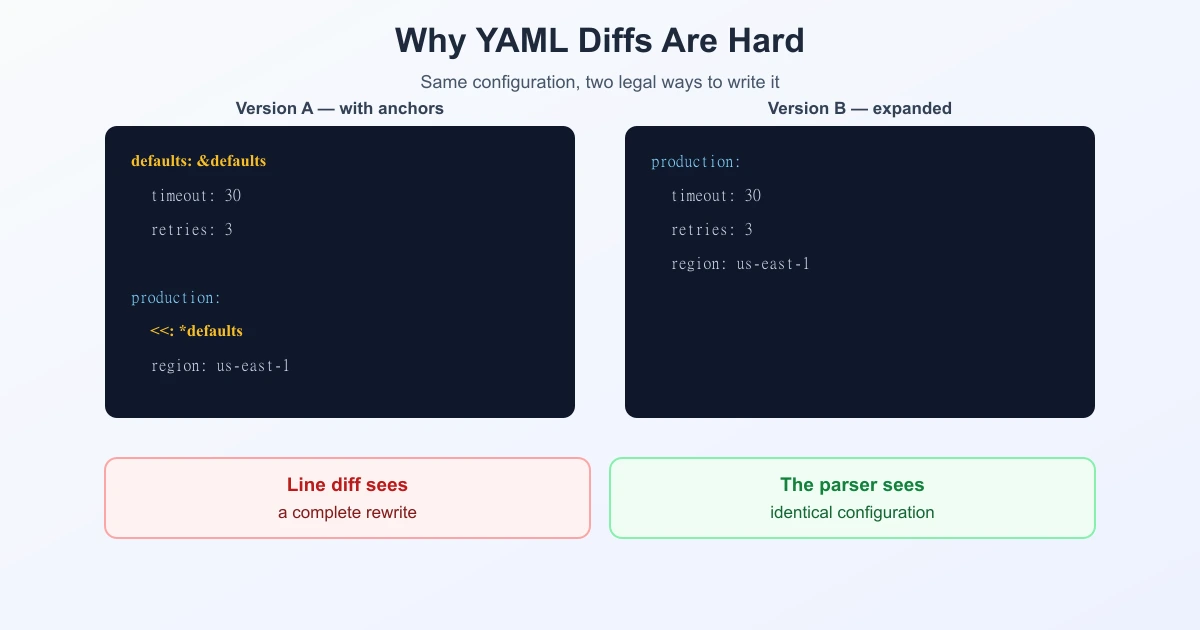
This is YAML's most powerful feature and its most confusing one for diffs. An anchor (&name) marks a value; an alias (*name) reuses it; a merge key (<<) folds a mapping into another.
# Version A — with an anchor
defaults: &defaults
  timeout: 30
  retries: 3

production:
  <<: *defaults
  region: us-east-1
# Version B — expanded
production:
timeout: 30
retries: 3
region: us-east-1After parsing, production is the same in both. As text they share almost nothing. If someone "cleans up" a config by expanding anchors — or introduces anchors to remove duplication — a line diff reports a rewrite when the effective configuration never changed.
Trap 3: Type Coercion and the Norway Problem
YAML infers types from unquoted values, and the rules are surprising. The famous example:
countries:
  - SE      → "SE"    (string)
  - FI      → "FI"    (string)
  - NO      → false   (boolean!)
Under YAML 1.1, the bare tokens yes, no, on, off, y, n and their capitalised variants are booleans. Norway's country code NO therefore parses as false — the reason this is known as the Norway problem.
YAML 1.2 fixed it: only true and false are booleans. But version matters enormously in practice, because many widely used parsers still default to 1.1 behaviour — including tooling across the Kubernetes ecosystem.
For comparison, this produces a nasty class of difference: enabled: yes and enabled: true are textually different and semantically identical, while country: NO and country: "NO" are almost identical textually and mean completely different things. A text diff cannot tell you which case you are in.
The habit that avoids all of it: quote anything that could be mistaken for a keyword, and write booleans as true/false.
Trap 4: Block Style vs. Flow Style
Every YAML collection can be written two ways, and both are correct:
# block style              # flow style (JSON-like)
tags:                      tags: [prod, api, v2]
  - prod
  - api
  - v2
Four lines versus one, same list. Switching style — which formatters and editors do automatically — rewrites the file without touching the data.
Trap 5: Multi-line String Styles
YAML has several ways to write a multi-line string, and they do not all mean the same thing:
| Style | Symbol | What it does to newlines |
|---|---|---|
| Literal | | | Keeps them |
| Folded | > | Folds them into spaces |
| Strip / keep | |- |+ | Controls the trailing newline |
Here the trap runs the other way. Changing | to > is a one-character diff that changes the value — a script embedded as a literal block still works, the same text folded into one line does not. Small text change, large real change.
Trap 6: Comments and Key Order Do Not Survive
YAML supports comments; the parsed data model does not. So if a tool reads YAML and writes it back out — a formatter, a templating step, an automated edit — the comments usually disappear and keys may be reordered. The configuration is unchanged; the file is unrecognisable in a diff.
Like JSON, mapping keys are unordered as data, so a re-serialised file can shuffle them freely.
Textual vs. Structural YAML Comparison
| Line diff | Structural (parse first) | |
|---|---|---|
| Anchors expanded | Huge diff | No change |
| Block ↔ flow style | Whole block changed | No change |
yes → true | Change | No change (1.1) |
NO → "NO" | Tiny change | Real change (bool → string) |
| Comments removed | Change | No change |
| Works on invalid YAML | Yes | No |
Note rows three and four: the line diff over-reports one and under-reports the other. That combination is what makes YAML review genuinely risky — the noisy differences are harmless and the harmless-looking one is not.
Getting a Trustworthy YAML Comparison
- Validate both files first. A tab in the indentation or a stray colon breaks parsing, and everything after that is guesswork.
- Normalise by round-tripping. Parse each file and re-serialise it with the same tool and settings. This expands anchors, unifies block/flow style, and applies one consistent indentation — so only real differences survive.
- Sort keys if your tool can. Removes reordering noise, exactly as with JSON.
- Compare, then read carefully. Paste both into a diff tool — you can compare text online — and pay special attention to any quote marks appearing or disappearing.
- Keep the original for review. Normalised YAML loses comments. Compare the normalised versions to find changes; go back to the originals to understand them.
And if the file will not parse at all, a plain line diff is still the fastest way to find the broken indentation — the one job where the "naive" comparison wins.
The Same Story Across Formats
Every format with a data model richer than lines has this split. JSON has key order and formatting; XML has attribute order and namespaces; YAML adds anchors, styles, and type inference. Even plain text has its own version of the problem, where encoding and Unicode normalization make identical-looking text differ. The remedy never changes: normalise first, compare second, and know which differences your tool can and cannot see. The comparison itself is the easy part — Myers and friends will faithfully diff whatever units you hand them.
Frequently Asked Questions
Why does my YAML diff show changes when the config is the same?
Usually because the same data was written differently — anchors expanded or introduced, block style swapped for flow style, re-indentation, or a formatter dropping comments and reordering keys. Round-trip both files through a parser to normalise them, then compare again.
What is the YAML Norway problem?
Under YAML 1.1, bare yes, no, on, off, y and n are booleans, so Norway's country code NO parses as false. YAML 1.2 removed those aliases, but many parsers still default to 1.1 behaviour. Quote such values to be safe.
What is the difference between YAML 1.1 and 1.2 for booleans?
YAML 1.1 accepts yes, no, on, off and similar as booleans. YAML 1.2 recognises only true and false. Since parser defaults vary, writing true/false explicitly avoids ambiguity.
Do anchors and aliases change the data?
No. Anchors (&name), aliases (*name) and merge keys (<<) are ways to avoid repetition. Expanding them produces the same parsed data but a completely different file, so a line diff will show a large change where none exists.
Can I use tabs in YAML?
No. YAML permits only spaces for indentation; a tab causes a parse error. Since indentation defines structure in YAML, indentation changes are not purely cosmetic the way they are in JSON.
What is the difference between | and > in YAML?
| is a literal block that preserves newlines; > is a folded block that turns them into spaces. Swapping one for the other is a one-character text change that genuinely changes the value — important for embedded scripts and formatted text.
How do I compare two YAML files reliably?
Validate both, round-trip them through the same parser with identical settings to normalise anchors, styles and indentation, sort keys if possible, then run the comparison. Keep the originals for context, since normalisation strips comments.
Sources
Related Reading
Compare Two Config Files
Remove credentials, then paste two YAML, JSON, or plain-text config versions and inspect every change.
Try TextCompareo