A semantic diff compares what two files mean rather than how they are written. A normal diff compares characters, so reformatting a file, reordering JSON keys, or renaming a variable all show up as change. A semantic diff parses both sides into a structure first and compares that — so cosmetic edits vanish and only real differences remain. This guide explains how it works, why it is harder than it sounds, and when a plain text diff is still the better tool.
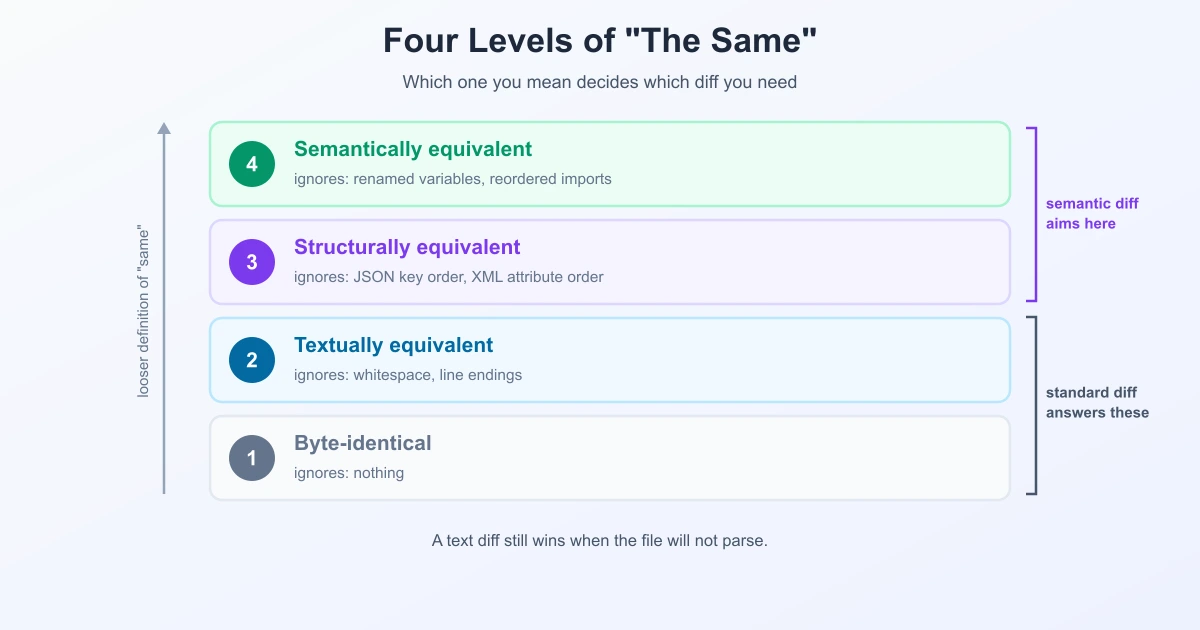
The Ladder of "Same"
Most confusion about diffs comes from one word doing too much work. Two files can be "the same" in four increasingly loose senses:
| Level | Means | Example of a difference it ignores |
|---|---|---|
| 1. Byte-identical | Exactly the same bytes | nothing |
| 2. Textually equivalent | Same after normalising whitespace | indentation, line endings |
| 3. Structurally equivalent | Same parsed data | JSON key order, XML attribute order |
| 4. Semantically equivalent | Same behaviour or meaning | renamed variable, reordered imports |
A standard diff answers level 1 (or level 2 with whitespace ignoring). "Semantic diff" is usually used loosely for both level 3 and level 4 — and that ambiguity matters, because level 3 is a solved problem and level 4 is genuinely hard.
Level 3: Structural Diff (the practical one)
Parse both files, compare the resulting data trees, ignore how they were written. This is what most "semantic diff" tools for data formats actually do, and it removes an entire class of false differences:
- JSON —
{"a":1,"b":2}and{"b":2,"a":1}are identical data. A line diff calls it a rewrite. See why JSON diffs are hard. - YAML — anchors expanded, block style swapped for flow style, comments dropped by a formatter. Same config, unrecognisable file. See why YAML diffs are hard.
- XML — attribute order carries no meaning, and neither does whitespace between elements. See comparing XML files.
The output changes shape too. Instead of line numbers, a structural diff reports paths: /users/3/profile/status: "active" → "suspended". That is usually what you actually wanted to know.
Level 4: AST Diff for Code
For source code, the structure is an abstract syntax tree (AST) — the parsed grammar of the program rather than its text. Tools parse both versions into trees and diff the trees.
The most common approach today uses Tree-sitter, a parser framework that turns source into an AST and exposes it to editors and tools through one standard interface. Two well-known implementations:
- Difftastic — a CLI structural diff that parses with Tree-sitter and reports differences at the expression level, supporting 30+ languages. Formatting and whitespace are ignored unless they change the structure.
- Diffsitter — also Tree-sitter based; it parses to an AST and then runs a longest-common-subsequence diff on the leaves of the tree.
That last detail is worth sitting with: even a structural diff usually ends up running LCS underneath. The tree does not replace the classic algorithm — it changes what the units are, which is exactly the granularity question from character vs. word vs. line-level diff, moved up one more level to syntax nodes.
The practical payoff for code: reindenting a function, wrapping a long line, or moving a closing brace produces no diff at all, while a genuine logic change stands alone.
Why It Is Harder Than It Sounds
Semantic diff is not simply better. The trade-offs are real:
- It needs a parser for every format and language. A text diff works on anything; a structural diff works only on what it can parse.
- It fails on broken input. When a config will not parse because of a stray comma, the structural tool has nothing to compare — and that is exactly the moment you most need to see what changed. A plain line diff still works there.
- You cannot apply it as a patch. The unified diff format is line-based; a tree diff is a view, not a transferable change.
- "Meaning" is ambiguous. Is renaming a variable a change? For behaviour, usually no. For a code review, absolutely yes. There is no single correct answer, so every tool picks a definition and you inherit it.
- It costs more. Parsing plus tree matching is heavier than comparing lines, and tree-matching algorithms are more expensive than sequence ones.
When to Use Which
| Situation | Use |
|---|---|
| Reviewing a reformatted or auto-formatted file | Structural / AST diff |
| Comparing two API responses or config exports | Structural diff (or normalise, then text diff) |
| A file will not parse / hunting a syntax error | Text diff — the only one that works |
| Producing a patch someone else will apply | Text diff (unified format) |
| Prose, documents, contracts | Text diff, word-level |
| An invisible difference is suspected | Text diff — see encoding traps |
That third row deserves emphasis, because it is the case people forget. Semantic tools are strictly less capable on invalid input, and invalid input is a normal Tuesday.
The Pragmatic Middle Ground
You do not need a dedicated tool to get most of the benefit. Normalise, then run a text diff:
- Validate both files.
- Round-trip them through the same parser with the same settings — pretty-print with identical indentation, expand anchors, unify quoting.
- Sort keys where order is not meaningful.
- Then diff the text. Whatever survives normalisation is a real difference.
This gets you level-3 equivalence with tools you already have, and it keeps the output patchable. It is the approach we recommend for JSON and YAML, and it works for XML and most config formats too.
In Everyday Comparison
Most comparison you do day to day — documents, prose, configs, snippets pasted from two places — is best served by a fast text diff with sensible options. That is what happens when you compare text online: an exact word-level comparison, with whitespace and case ignoring available for when the noise gets in the way. Reach for a structural or AST tool when formatting churn is drowning out the real change, and reach back for the text diff the moment something will not parse.
Frequently Asked Questions
What is a semantic diff?
A comparison that looks at what two files mean rather than the exact characters. It parses both sides into a structure — a data tree for formats like JSON, or an abstract syntax tree for code — and reports differences in that structure, so reformatting and reordering do not show up as changes.
What is the difference between a semantic diff and a structural diff?
They are often used interchangeably. Structural diff usually means comparing parsed data (JSON keys, XML elements), while semantic diff can go further and consider behaviour — for example treating a renamed variable as not a real change. Structural is a solved problem; full semantic equivalence is much harder.
What is an AST diff?
A diff computed on the abstract syntax tree of source code rather than its text. Tools such as Difftastic and Diffsitter parse code with Tree-sitter and compare the resulting trees, so indentation and line wrapping produce no diff while logic changes stand out.
Is a semantic diff always better than a text diff?
No. It requires a parser for the language or format, it cannot compare files that fail to parse, it cannot be applied as a patch, and it is slower. A text diff works on anything, including a broken config — which is often exactly when you need it.
Can I get semantic-diff benefits without a special tool?
Mostly, yes. Validate both files, round-trip them through the same parser to normalise formatting, sort keys where order is meaningless, and then run a normal text diff. Everything that survives is a real difference, and the output stays patchable.
Does a semantic diff still use a diff algorithm underneath?
Usually. Diffsitter, for example, parses to an AST and then runs a longest-common-subsequence diff on the tree's leaves. The tree changes what counts as a unit; the underlying matching is still classic sequence diffing.
When should I not use a semantic diff?
When a file will not parse, when you need to produce a patch, when comparing prose or documents, or when you are specifically hunting an invisible character or encoding difference — a semantic tool would normalise away the very thing you are looking for.
Sources
- Difftastic — a structural diff that understands syntax
- Diffsitter — a Tree-sitter based AST difftool
- Tree-sitter — parser generator and incremental parsing library
Related Reading
Compare Two Versions Now
Normalise two non-sensitive versions, then inspect the differences that remain.
Try TextCompareo