GitHub stacked pull requests entered public preview on 30 July 2026, rolling out to all repositories. The idea is simple: instead of one giant pull request that nobody wants to review, you split a large change into an ordered series of small ones — each building on the layer below — and reviewers see only the diff for the layer they are looking at. It is a change to how big code changes get reviewed, and it is really a change about diff size.
The Problem It Solves
Every team knows the feeling. A feature takes three weeks, touches forty files, and arrives as a single pull request. GitHub described the situation plainly in its announcement: a big change used to mean one giant PR nobody wanted to review.
Large diffs get worse reviews. Reviewers skim, approve, and hope. The alternative — waiting for each piece to merge before opening the next — blocks the author for days. Stacked pull requests are an attempt to escape that trade-off.
How a Stack Actually Works
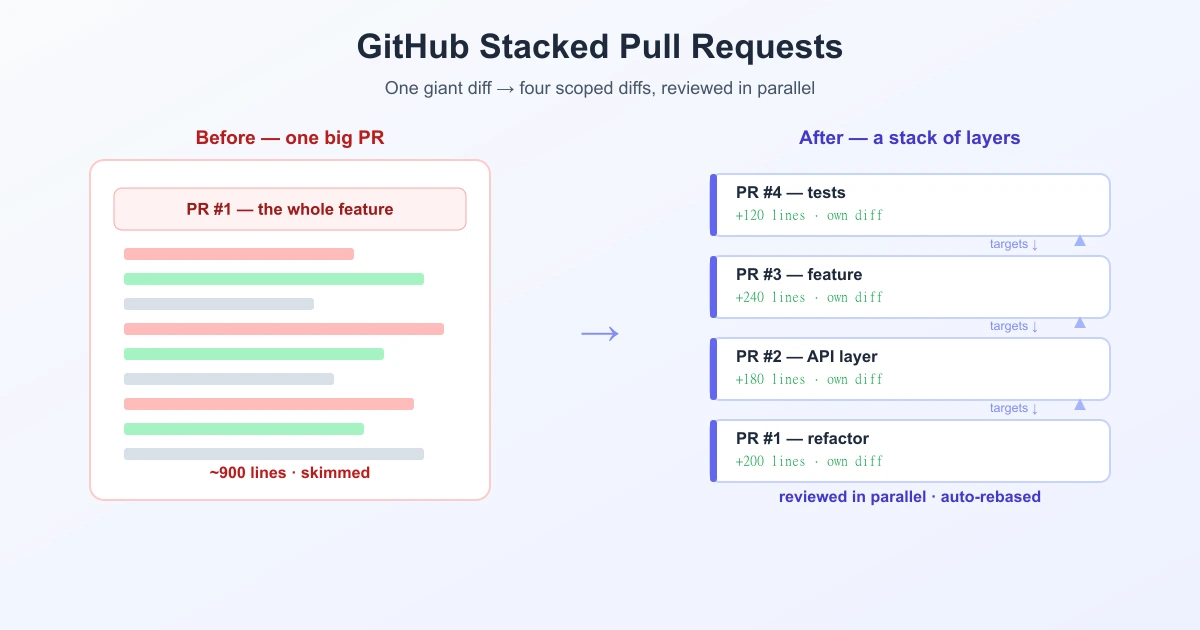
A stack is an ordered chain of pull requests. The first targets your main branch. The second targets the first PR's branch. The third targets the second, and so on. Each link in the chain holds one focused layer of the work.
Three things follow from that structure:
- Each PR shows only its own diff. Open layer 3 and you see just layer 3's changes — not everything underneath it.
- A stack map sits at the top of each PR, showing where the layer you are reviewing fits in the whole change.
- Reviews happen in parallel. Someone can review layer 3 while layer 1 is still being discussed. Nothing has to merge first.
What happens when you merge
Merging a ready pull request lands it along with every unmerged layer below it. If you merge only a lower layer, the pull requests above it stay open and GitHub rebases and retargets them automatically on its own servers — the part that used to be tedious manual branch surgery. Existing branch protections and required checks still apply.
Why It Matters
The real subject here is diff size, and that is a well-understood problem in code review. A reviewer's attention does not scale with the number of lines in front of them. Split the same work into four 200-line diffs and each one gets read properly; leave it as one 900-line diff and most of it gets skimmed.
Stacked PRs make the small-diff workflow practical on GitHub without external tooling. Teams have chased this for years with third-party tools and homemade scripts; having it native — with automatic rebasing and a visible stack map — removes most of the friction that made people give up and open one big PR anyway.
| One large PR | Stacked PRs | |
|---|---|---|
| Diff a reviewer sees | Everything at once | Only that layer |
| Review order | Sequential, one blob | Parallel, per layer |
| Author blocked? | No, but review is slow | No — keep stacking |
| Rebasing after a merge | n/a | Automatic |
| Risk of a rubber-stamp | High | Lower |
Where You Can Use It
Stacks work from github.com, the GitHub mobile app, and the GitHub CLI through a dedicated extension:
gh extension install github/gh-stackGitHub also names coding agents such as GitHub Copilot as first-class participants, able to work with stacks through the same gh-stack skill — a nod to the fact that AI-generated changes have exactly the "too big to review" problem this feature targets.
What Happens Next
Two things are still in motion. The feature itself is in public preview, rolling out to repositories over days rather than all at once. And merge queue support for stacks is arriving separately, progressively over the coming weeks — so teams that gate merges through a queue may need to wait before adopting stacks fully.
If you want to try it, start with a change you would naturally split anyway: a refactor, then the feature, then the tests. That shape maps cleanly onto layers and shows the benefit immediately.
The Underlying Point: Diffs You Can Actually Read
Strip away the branch mechanics and stacked PRs are about presenting changes in a form a human can process. That is the same goal every diff tool has. The algorithm decides which lines are marked as changed — by default Myers, with patience and histogram producing cleaner alignment in code — and the unified diff format decides how it is written down. Stacked PRs work one level above both: they decide how much change you are asked to read at once.
Outside a repository, the same principle applies. When you compare text online, a smaller, focused comparison is always easier to trust than one enormous one.
Frequently Asked Questions
What are stacked pull requests on GitHub?
They are an ordered series of pull requests where each one targets the branch of the PR below it. Each holds one focused layer of a larger change, so reviewers see only that layer's diff instead of the whole thing at once.
When were GitHub stacked pull requests released?
They entered public preview on 30 July 2026 and are rolling out to all repositories. Merge queue support for stacks is rolling out separately over the following weeks.
What happens when you merge a stacked pull request?
Merging a ready PR lands it along with any unmerged layers below it. If you merge only a lower layer, the PRs above stay open and GitHub automatically rebases and retargets them. Branch protections and required checks still apply.
How do I use stacked pull requests from the command line?
Install the GitHub CLI extension with gh extension install github/gh-stack. Stacks also work from github.com and the GitHub mobile app.
Why are stacked pull requests better for code review?
Because reviewer attention does not scale with diff size. Four small, scoped diffs get read carefully; one very large diff tends to get skimmed. Stacks also let different layers be reviewed in parallel instead of waiting on each other.
Do stacked pull requests work with GitHub Copilot?
Yes. GitHub names coding agents such as Copilot as first-class participants in stacks, working through the same gh-stack skill.
Sources
- GitHub Changelog — Stacked pull requests are now in public preview
- InfoQ — GitHub targets the large merge problem with stacked PRs
Related Reading
Compare Two Versions Instantly
No repo needed — paste two versions of any file or code and get a clean, focused diff in seconds. Free and private.
Try TextCompareo