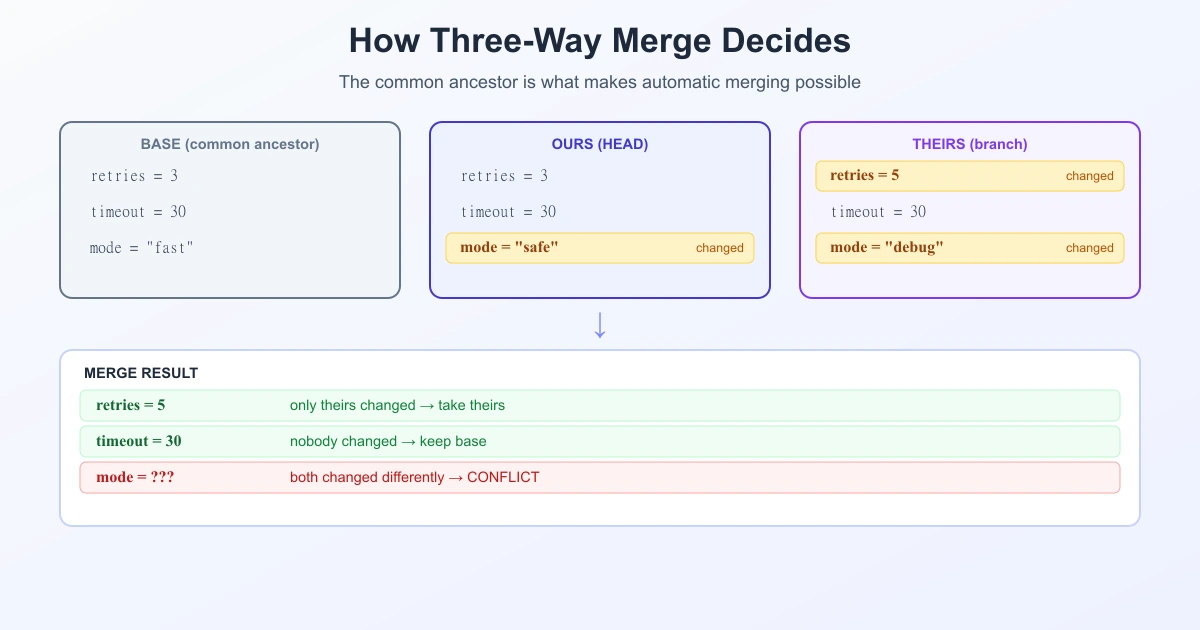
A three-way merge combines two versions of a file by looking at a third one: the common ancestor both versions started from. That third version is what lets Git tell the difference between "you changed this line" and "they changed this line" — and it is the reason merging usually works silently, and why conflicts appear only when they genuinely have to. This guide explains the mechanism, the exact rule Git applies to each line, and how to read the conflict markers when it cannot decide.
Why Two Versions Are Not Enough
Imagine you have two versions of a line and nothing else:
Version A:   timeout = 30
Version B:   timeout = 60
Which one is right? You cannot say. Did A change it from 60 to 30, or did B change it from 30 to 60? With only two versions, every difference looks like a disagreement, so a two-way merge has to ask a human about everything.
Now add the version they both started from:
Base (ancestor):   timeout = 30
Version A:         timeout = 30      ← unchanged
Version B:         timeout = 60      ← changed
The answer is now obvious: only B touched it, so take B's value. That single extra input turns most merges from a question into an automatic decision.
The Three Inputs
- Base — the common ancestor, the last commit both branches shared. Git finds it with
git merge-base. - Ours — the version on the branch you are merging into (your current
HEAD). - Theirs — the version on the branch being merged in.
Git effectively computes two diffs — base→ours and base→theirs — and then combines them. So a merge is built out of the same machinery as git diff; it just runs the comparison twice and reconciles the results.
The Rule Git Applies to Every Region
For each region of the file, there are four possibilities. This table is the three-way merge:
| Ours vs. base | Theirs vs. base | Result |
|---|---|---|
| unchanged | unchanged | keep the base version |
| changed | unchanged | take ours — automatic |
| unchanged | changed | take theirs — automatic |
| changed | changed differently | conflict — a human decides |
There is a fifth, quieter case: both sides made the same change. Git takes it once and says nothing.
Read that table again and the everyday experience of Git makes sense. Two people editing different functions in the same file merge cleanly, because each region was changed by only one side. A conflict is not Git being unhelpful — it is Git saying the base gives it no way to choose.
Reading the Conflict Markers
When Git cannot decide, it writes both versions into the file:
<<<<<<< HEAD
timeout = 30
=======
timeout = 60
>>>>>>> feature-branch
<<<<<<< HEAD— everything below this is ours.=======— the divider.>>>>>>> branch-name— everything above this (and below the divider) is theirs.
Your job is to replace the whole block — markers included — with the correct final text. Nothing is automatic here, and nothing should be: the base could not decide, so intent has to come from you.
Show the base too: diff3 and zdiff3
The default markers hide the most useful piece of information — what the line looked like before either side touched it. Turn it on:
git config --global merge.conflictStyle zdiff3Now conflicts include a third section between ||||||| and ======= showing the base version. With it you can see who changed what, instead of guessing from two finished states.
zdiff3 ("zealous diff3") is available from Git 2.35 onward and is the better choice. It behaves like diff3 but moves common lines at the start and end of a conflict outside the conflict block, so the marked region is only the part that genuinely disagrees. Smaller conflicts, same information.
The name is not a coincidence: diff3 is a Unix utility from 1979 for comparing three versions of a file. Git's conflict markers are essentially its output written inline.
The Strategy Doing the Work: ort
Git's default merge strategy is ort — playfully named "Ostensibly Recursive's Twin", because it replaced the older recursive strategy while producing the same results. It performs the three-way merge described above, with much better performance and memory use on large repositories. GitHub adopted merge-ort for its own merge operations in 2022.
One detail worth knowing: when two branches have more than one common ancestor, ort merges those ancestors together first to build a single virtual base, then runs the normal three-way merge against it. That is what "recursive" referred to, and it is why complex histories still merge sensibly.
Why You Get Conflicts, and How to Get Fewer
Conflicts come from one thing: two branches changing the same region without a shared base to arbitrate. Practical ways to reduce them:
- Merge often. The longer a branch lives, the further it drifts from the base and the more overlapping regions accumulate.
- Keep changes small and separated. Smaller, focused branches touch fewer regions — the same logic behind stacked pull requests.
- Agree on formatting. A reformat touches every line, which turns every parallel edit into a conflict.
- Turn on zdiff3. It will not prevent conflicts, but seeing the base makes resolving them far faster.
And when a conflict is genuinely confusing, remember what it means: both sides changed the same thing in different ways. That is a question about intent, not about tooling — the fastest resolution is usually to ask the other author what they meant.
It All Rests on Diff
A three-way merge is two diffs and a decision rule. Which lines count as "changed" comes from the diff algorithm underneath — by default Myers, with patience and histogram aligning code more cleanly, all of them ultimately computing a longest common subsequence. Better alignment means fewer regions marked as changed, which means fewer false conflicts. If you just want to see how two versions differ without a repository involved, you can compare text online and read the changes directly.
Frequently Asked Questions
What is a three-way merge?
A merge that compares two versions of a file against their common ancestor. Because it knows what both sides started from, it can tell which side changed each region and apply that change automatically, only asking for help when both sides changed the same region differently.
What is the difference between a two-way and a three-way merge?
A two-way merge sees only the two versions, so every difference looks like a disagreement and must be resolved by hand. A three-way merge adds the common ancestor, which lets it resolve most differences automatically.
What do "ours" and "theirs" mean in a Git conflict?
"Ours" is the version on the branch you are merging into (your current HEAD); "theirs" is the version from the branch being merged in. In the conflict markers, ours appears above the ======= divider and theirs below it.
How do I see the original version in a merge conflict?
Set the conflict style to show the base: git config --global merge.conflictStyle zdiff3. Conflicts then include a section between ||||||| and ======= with the common-ancestor version.
What is the difference between diff3 and zdiff3?
Both show the base version inside conflicts. zdiff3 ("zealous diff3", available from Git 2.35) additionally moves common lines at the start and end of a conflict outside the conflict block, so the marked region covers only the genuinely disagreeing part.
What is the ort merge strategy?
It is Git's default merge strategy, named "Ostensibly Recursive's Twin". It performs the standard three-way merge but with far better performance and memory usage than the older recursive strategy, and it handles multiple common ancestors by merging them into a single virtual base first.
Why does Git create merge conflicts at all?
Because both branches changed the same region in different ways relative to the common ancestor. Git has no basis for preferring one over the other, so it stops and asks. Everything it can decide from the base, it decides silently.
Sources
- Git — merge strategies documentation
- Git — git-merge-base documentation
- GitHub Changelog — merge commits now use merge-ort
Related Reading
Compare Two Versions Side by Side
Paste any two versions of a file and see exactly what changed — free, private, no repository needed.
Try TextCompareo