On 7 August 2026, GitHub made Copilot code review effort levels generally available. You now pick how hard the AI reviewer works: Lite for straightforward changes, Balanced when a change deserves deeper analysis from a higher-reasoning model. It is a small settings change with a bigger idea underneath — that review effort should match how complex a change actually is. Which raises the question the feature does not answer: how do you know how complex a change is before someone reviews it?
What Shipped
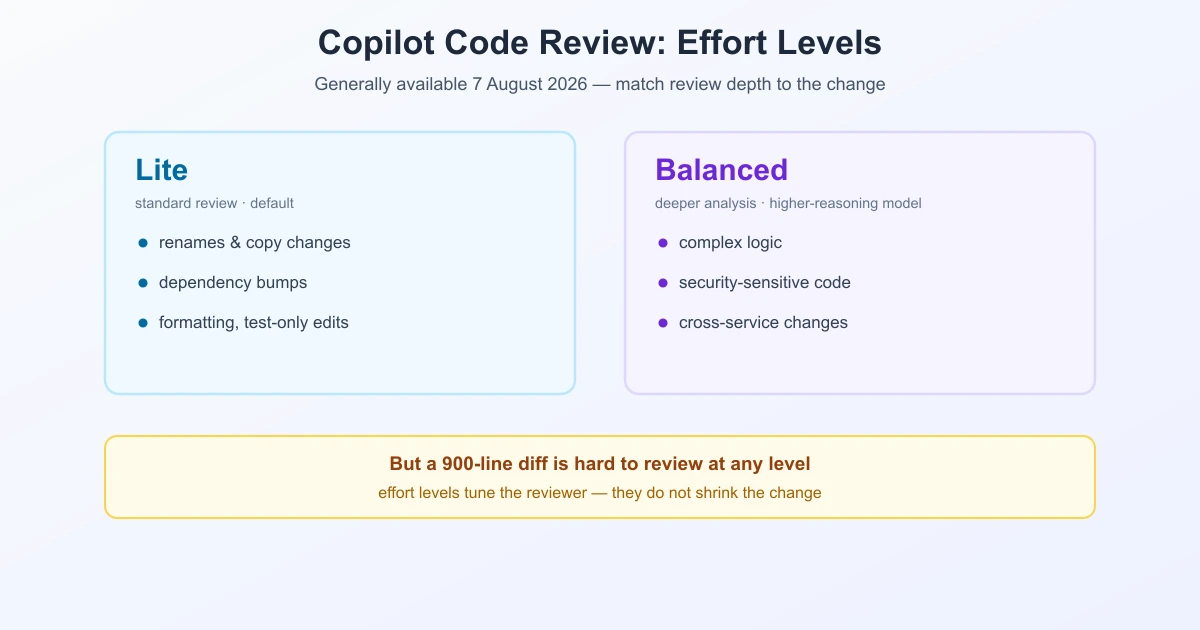
The two levels that ran during public preview as "Low" and "Medium" are now named Lite and Balanced, and both are generally available:
| Level | What it does | Use it for |
|---|---|---|
| Lite | Standard review (the default) | Straightforward changes |
| Balanced | Deeper analysis from a higher-reasoning model | Complex logic, security-sensitive code, cross-service changes |
Two practical details matter. You can set an organisation-wide default that repositories inherit, while still overriding it for a single review — and that one-off choice does not change the repo or org default. And Copilot now labels which level ran, both in the timeline and in the pull request overview comment, so review depth is visible after the fact rather than guesswork.
The levels are available on Copilot Pro, Pro+, Max, Business, and Enterprise plans.
Why It Matters
The interesting part is not the setting, it is the assumption behind it: not every change deserves the same depth of review. A one-line copy fix and a change to authentication logic are not the same job, and treating them identically wastes attention on one and under-serves the other.
That is true of human review too, and it has always been true. What is new is that the depth is now an explicit, recorded decision instead of an implicit one. When a reviewer skims, nobody logs it. When Copilot runs Lite, the pull request says so.
The Judgement Call It Hands Back to You
Choosing an effort level means judging complexity before the review happens. In practice, the evidence you have at that moment is the diff: how many files, how many lines, and which parts of the system they touch.
And that is where the real constraint sits. A 900-line pull request is hard to review at any effort level, human or machine, because the problem is not the depth of analysis — it is the amount of change competing for attention at once. Effort levels tune the reviewer; they do not shrink the change.
This is exactly the gap that stacked pull requests target: split a large change into layers so each one carries a small, scoped diff. Combine the two and the workflow becomes coherent — small layers reviewed with Lite, the one layer touching auth or a shared service reviewed with Balanced.
A Practical Way to Choose
- Balanced when the diff touches authentication, permissions, payments, data migrations, or anything crossing service boundaries.
- Balanced when the change is small but subtle — a concurrency fix or an edge-case condition, where line count understates risk.
- Lite for renames, copy changes, dependency bumps, formatting, and test-only edits.
- Neither is a substitute for splitting a change that is simply too large to review well.
One caveat worth stating plainly: line count is a rough proxy for risk, not a measure of it. A three-line change to a permission check can be more dangerous than a three-hundred-line refactor of test fixtures. Use the diff to see what was touched, not just how much.
Update, 27 August 2026: the size cap is gone
Two things changed since this was written, and one of them goes straight at the argument above.
The smaller change is that resolving a Copilot comment now asks you why. A dropdown beside Resolve conversation offers Addressed, Won't fix and Incorrect. That is feedback plumbing rather than a review feature, but the third option is the interesting one, because it gives GitHub a direct count of how often the model is simply wrong.
The larger change is that Copilot code review now looks at pull requests it used to refuse. Bot-authored ones are included, which matters as more pull requests start arriving from agents rather than people. And the size ceiling is gone. The service previously stopped at 300 files or 20,000 lines of code, and no longer enforces either limit.
It would be easy to read that as the end of the size problem. It is closer to the opposite.
The cap was a guardrail. While it existed, a pull request past it simply did not get reviewed, and you found out straight away. With the cap gone, nothing stops a two thousand file change from being sent off and coming back with comments. Those comments will be real. Whether they cover the change is a different question, and the answer still depends on how much of that diff is signal rather than noise.
So the advice does not change. The effort level tunes how hard the model looks. The size of the diff decides how much there is to look at, and now nothing stands in the way of making that number enormous.
What Happens Next
Update, 28 August 2026: GitHub announced that the Default setting will use Balanced for existing and new repositories and organisations starting 28 September 2026. Teams that want to retain Lite should select Lite explicitly rather than leaving the setting on Default. This is a scheduled product change, so confirm the current setting in GitHub before relying on it.
Effort levels are GA, and GitHub continues to change the review pipeline. The important operational point is to make the repository or organisation default explicit, then check the label on each review to see which effort level actually ran.
Underneath It Is Still a Diff
Whatever reviews the code — a person, Copilot on Lite, or Copilot on Balanced — the input is the same: a diff produced by a diff algorithm and written in a standard format. How cleanly that diff lines up decides how much of it is signal. That is why the choice of algorithm matters for readability (patience and histogram align code better than plain Myers), and why knowing how to read a unified diff is still a core reviewing skill. If you want to inspect two versions outside a pull request, you can compare text online and read the change directly.
Frequently Asked Questions
What are Copilot code review effort levels?
They let you choose how deeply Copilot reviews a pull request. Lite is the standard review and the default; Balanced runs a deeper analysis using a higher-reasoning model for complex logic, security-sensitive code, and cross-service changes.
When did effort levels become generally available?
GitHub announced general availability on 7 August 2026. The levels previously ran as "Low" and "Medium" during public preview and were renamed Lite and Balanced.
What is the difference between Lite and Balanced?
Lite is the standard review suited to straightforward changes. Balanced applies deeper analysis and is intended for complex logic, security-sensitive code, and changes that cross service boundaries.
Can I set a default effort level for my organisation?
Yes. You can set an organisation-wide default that repositories inherit, and still choose a different level for an individual review — that one-off choice does not change the repository or organisation default.
How do I know which effort level was used on a pull request?
Copilot labels the level that ran in both the timeline events and the pull request overview comment.
Which plans include effort levels?
They are available with Copilot Pro, Pro+, Max, Business, and Enterprise plans.
Does a higher effort level make large pull requests easier to review?
Only partly. Deeper analysis helps, but a very large diff is hard to review at any depth because too much change competes for attention at once. Splitting the change into smaller, scoped diffs does more than raising the effort level.
Sources
- GitHub Changelog — Copilot code review: Resolution reasons and expanded capabilities
- GitHub Changelog — Copilot code review effort levels are generally available
- GitHub Changelog — Default review effort changes to Balanced on 28 September 2026
- GitHub Docs — Configuring automatic code review by GitHub Copilot
Related Reading
Read Any Change, Line by Line
Paste two versions of a file and see exactly what moved — free, private, no repository needed.
Try TextCompareo